

AI Match Recommendation
Last updated
AI Match Recommendation uses artificial intelligence to analyze Deduplicate Job results and indicate whether records are likely to be duplicate or not. Use this advice to decide whether to merge records or not; manually or with an auto merge job based on the AI advice.
Strict matching rules can miss fuzzy matches that might be legitimate duplicates, but relaxing match rules leads to more potential duplicates that require a lot of manual reviewing. AI Match Recommendation can compare records holistically, thus catching duplicates that straightforward match rules could miss, and at the same time relieving you from a large portion of the manual reviewing work.
AI Match Recommendation does not make use of the scenarios of the Deduplicate Job. This allows it to be more flexible and open-minded in assessing whether records are duplicates. It might well find a pair with only a 90% matching score based on the job's scenario, and still consider it ‘duplicate’ because of all fields considered together. Conversely it can also label a record pair as ‘uncertain’, even when it scored 100% based on the job scenario, because of fields that were not included in the scenario.
Each AI Match Recommendation result always comes with an explanation for how it came to its conclusion.
To comply with privacy regulations, enabling this feature requires signing a Data Processing Agreement (DPA), ensuring your data is processed lawfully and securely. AI Match Recommendation can be accessed after the DPA is signed.
Enabling AI Match Recommendations
- In Deduplicate Setup > AI Data Steward, first sign the DPA;
- Then, toggle the AI Match Recommendation setting to ‘Active’.
Read more in Enabling AI Recommendation Features.
Using AI Match Recommendation
Prerequisites
- If you are not using the Deduplicate Permission Set, you have added apex class 'dc3DuplicateRecommendationBatch' to your profile.
After signing the Data Processing Agreement and enabling the setting, the AI Match Recommendation option will be available in the Deduplicate Job modal when creating a new job, and in the Job Options menu of finished Deduplicate jobs with at least 1 result.
Include AI Match Recommendation in Job run
To run AI Match Recommendation within a Deduplicate Job:
Start a new Deduplicate Job.
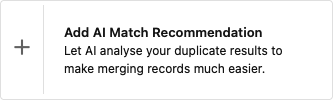
In step 2, ‘Job Options’, click Add AI Match Recommendation
 .
.Select an AI Match Recommendation Threshold. These are the minimum and maximum duplicate matching scores for the records that AI Match Recommendation will analyze.
Select Add Auto Merge (optional) if you want to merge certain records automatically. Next to the Auto Merge Threshold, you can select an AI Match Recommendation Status. Auto Merge will automatically merge all duplicate pairs that have both that status, and the set Auto Merge Threshold match score or up.
It is recommended to only merge status Duplicate automatically.
Run the job.
The AI Match Recommendation will appear as a subjob in the job overview. If you added Auto Merge, it will be displayed below it as well.

Auto Merge with AI Match Recommendation
When using Auto Merge on its own, it is recommended to auto merge only those duplicates that have a matching percentage of 100%. With AI Match Recommendation, status ‘Duplicate’ added, the Auto Merge Threshold can be set a little lower, e.g. 98% or 97%, as the AI match advice adds more certainty.
AI Match Recommendation job runs on Salesforce
The AI Match Recommendation subjob always runs on the Salesforce platform, regardless of where the Deduplication job was started (Salesforce, Plauti Cloud, or Plauti Desktop/Server).
Run AI Match Recommendation after running a Job
To apply AI Match Recommendation to the results of a Deduplicate Job you ran previously:
Go to the Deduplicate Job Overview and find the job.
At right, select Job Options > AI Match Recommendation.
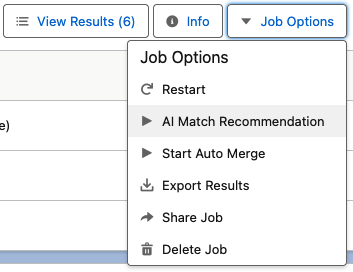
Select an AI Match Recommendation Threshold. These are the minimum and maximum duplicate matching scores for the records that AI Match Recommendation will analyze.
Select a Processing Option and click Next.
Review your settings and click Start.
The AI Match Recommendation will appear as a subjob in the job overview.
The AI Matching Recommendation results
The Match Recommendations are always analyzed per duplicate pair. When a duplicate group contains pairs with different match recommendations, the group will display 'Uncertain' as recommendation. So when a duplicate group contains 1 ‘Duplicate’ pair and 1 ‘Uncertain’ pair, the group will show as ‘Uncertain’.
In the Job Overview you can quickly see the Match Recommendation analysis for the job: in the Result column of the AI Match Recommendation subjob line.

Click View Results
 to dive deeper into the Match Recommendation analysis.
As stated, the Group view will display the advice found for the entire group. To view the AI Match Recommendation per pair, click Switch to Pair View in the Action menu of a group.
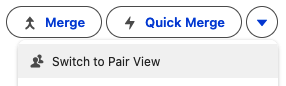
Now you'll see the AI advice for each pair in the duplicate group. Hover over the Information
 ** icon to read the AI's reasoning for the advice. Note that this advice can differ from the scenario results, depending on which fields and other settings you used in the scenario. AI Match Recommendation takes the entire record into account.**
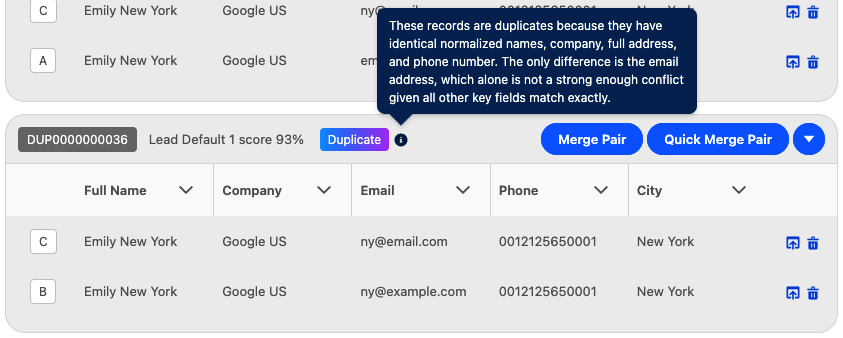
A pair with AI Advice ‘Duplicate’, and the AI's reasoning
Decide to merge a pair or not based on the AI Advice in combination with the scenario matching score.
Use the AI Match Recommendation Status to filter job results, for example to only merge records with a certain status in Auto Merge, or to only display duplicate groups with a certain AI Advice in Overall Job Results.
Troubleshooting
Problem:
The AI Match Recommendation job option is greyed-out and unresponsive
Answer:
AI Match Recommendation might be unavailable because
- It is disabled in Deduplicate Setup
- The DPA has not been signed yet
- It is not available for your license