

AI Merge Recommendation
AI Merge Recommendation uses artificial intelligence to suggest the most suitable field values when manually merging duplicate records, analyzing all selected records holistically for improved accuracy. When enabled, relevant record data is securely sent to Plauti's AI provider, who returns field-by-field recommendations with clear explanations. AI suggestions are always visible for review, and require your confirmation before any changes are applied. No automatic merges will occur.
The Manual Merge page suggests a master record and field values to keep based on the Merge Rules, such as “shortest value” or “Most recently updated”. However, these values are not always the values you want to keep. Plauti AI Merge Recommendation considers the full context of the records to merge, resulting in more useful merge suggestions.
To comply with privacy regulations, enabling this feature requires signing a Data Processing Agreement (DPA), ensuring your data is processed lawfully and securely. AI Merge Recommendation can be accessed after the DPA is signed.
The following field types are not yet supported:
- Encrypted fields
- Masked fields
- Dependent fields
Enabling AI Merge Recommendations
- In Deduplicate Setup > AI Data Steward, first sign the DPA;
- Then, toggle the AI Merge Recommendation setting to ‘Active’.
Read more in Enabling AI Recommendation Features.
Configuring AI Merge Recommendation
AI Merge Recommendation can be used in up to ten merge fields. Either let AI Merge Recommendation decide which fields to use, or configure fixed fields that can use the feature.
- Let AI Merge Recommendation decide
You can let the feature decide for itself which fields are most useful to apply AI Merge Recommendation to. In that case you do not need to configure anything. In the Merge Rules settings of each Object, for each field, the toggle in the ‘AI Merge’ will be set to ‘No’, and AI Merge Recommendation will decide on a case-by-case basis whether to include a field or not.
- Set fixed fields for AI Merge Recommendation
You can configure up to ten fields that can get a recommendation. The other fields will merge based on the Merge Rules.
AI Merge Recommendation will review the other record fields as well to determine the best merge value. For example, if you only enable Email for AI Merge, AI Merge Recommendation will check the Website field as well to see if it happens to contain a URL with the same domain name as the email address, to improve certainty of the Email merge value recommendation. However, the Website field itself will get a Merge Rule merge suggestion in this case.
Go to Deduplicate Setup.
At left, select Object Configuration, and click Configure
 at the Object you want to configure AI Merge Recommendation for.
At the Object, go to tab Merge Rules and click Edit
 .
.Find the fields you want to get an AI merge recommendation for.
At each field (maximum: 10), at right, toggle AI Merge.
Click Save.
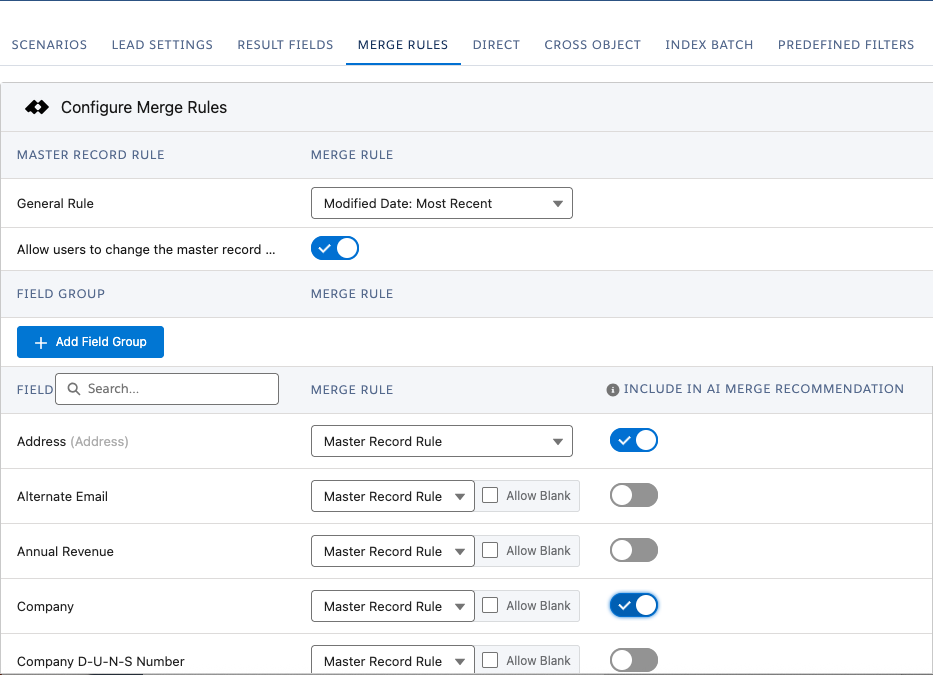
Repeat for each Object where you want to use AI Merge Recommendation with set fields.
Direct Processing
Direct Processing can use AI Merge Recommendation as well.
Still in Object Configuration, switch to tab Direct.
At ‘Merge Settings’, click Configure
 .
.Toggle AI Merge Recommendation to ‘Active’.
When activated, AI Merge Recommendation for Direct Processing uses the same field settings in the Merge Rules as you set for Manual Merge above.
Using AI Merge Recommendation
Prerequisites
- If you are not using the Deduplicate Permission Set, you have added apex class 'dc3SecureRedirectController' to your profile.
Manual Merge
After signing the Data Processing Agreement and enabling the setting, the AI Merge Recommendation button will be activated in the Manual Merge modal. Click to generate AI-based merge suggestions.
In the Manual Merge modal, at the top, click Plauti AI - Merge Recommendation
 .
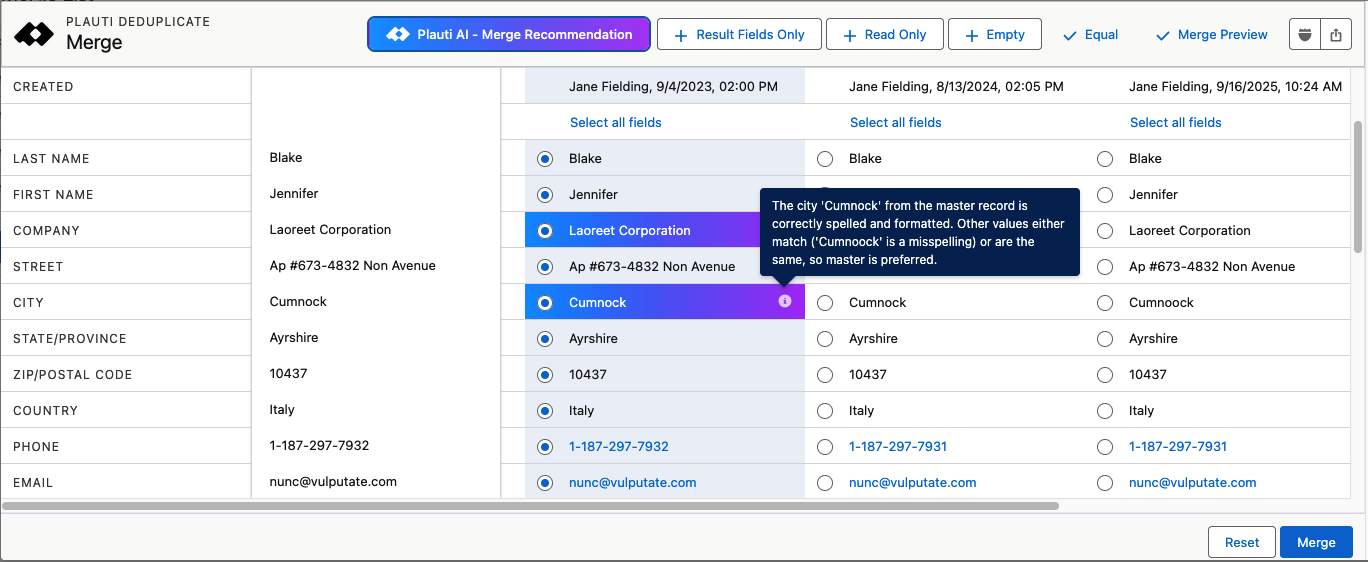
.The field values that AI Merge Recommendation suggests using are highlighted in blue-purple.
Hover over the Information
 icon in each recommended field to review the reason for selecting this specific value over the others.
If you don't agree you can always select a different field value instead.
When all field values that you want to save to the master record are selected, click Merge.
The records will now be merged into the master record, with the values you and AI Merge Recommendation selected.
In the example below, the user first selected ‘Cumnoock’ as the City value to keep. AI then suggests to keep ‘Cumnock’ instead and explains its reasoning.
 *
*
"The city 'Cumnock' from the master record is correctly spelled and formatted. Other values either match ('Cumnoock' is a misspelling) or are the same, so master is preferred.”
Auto Merge
Select per Auto Merge job whether to use AI Merge Recommendation or not.
Create a new Deduplicate Job, or find an existing job you want to auto merge.
In Job Options, click Add Auto Merge or Start Auto Merge.
in the Auto Merge Threshold section, toggle AI Auto Merge.

Continue creating the job.
Auto Merge will now use AI Merge Recommendation for the fields you selected in the Merge Rules. If no fields were selected AI Merge Recommendation is applied to suitable fields.
Direct Processing
When activated for Direct Processing (see above), AI Merge Recommendation works the same as for Manual Merge:
- When fields are marked for inclusion, only those fields will get an AI merge recommendation.
- With AI Merge Recommendation enabled but no fields marked, Plauti Deduplicate will use AI Merge Recommendation to decide which fields are suitable to apply AI Merge Recommendation's value selection to.
For other fields, Plauti Deduplicate will use the Merge Rules to determine the value to retain on the Master record.
Audit Log
For each field merged based on AI Merge Recommendation, the Audit Log will capture:
- The selected value
- A classification indicating it was an “AIMERGERECOMMENDATION”
- The AI’s explanation for its decision in one or two lines
AI Merge Recommendation and the Merge Plugin
When it comes to using the Merge Plugin, the AI Merge Recommendations carry the same weight as manually selected merge fields: the settings of the Merge Plugin will always overrule any conflicting selected fields. In other words, the Merge Plugin settings will always take precedence.
Troubleshooting
Problem:
The Plauti AI - Merge Recommendation button is greyed-out and unresponsive
Answer:
Hover over the Information  icon to see the reason for this. AI Merge Recommendation might be unavailable because
- It is disabled in Deduplicate Setup
- The DPA has not been signed yet
- It is not available for your license
