In Plauti Deduplicate, you can convert a Lead from a Quick Action, Deduplicate live, Deduplicate Job, or Overall Job Results. Depending on where you're coming from, it's possible that Plauti Deduplicate already identified a potential duplicate in another object based on the Cross Object setting.
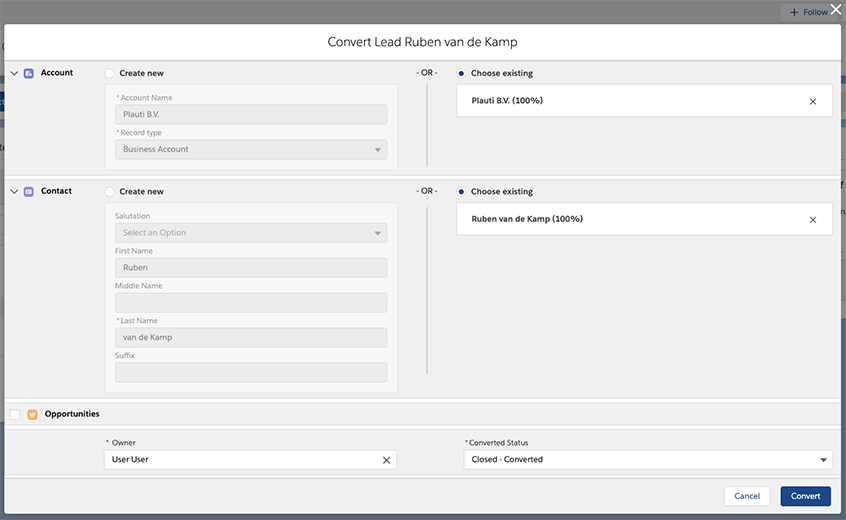
Instead of creating a new (Person) Account and/or Contact, decide to convert into the existing records. If no record is pre-selected yet, Plauti Deduplicate will give you a suggestion based on the applied scenarios.
When converting a Lead into an existing Account and/or Contact, field values in the Contact or Account record take precedence over the Lead record value; unless a field is empty, then the Lead record value is kept.
In the process of converting a Lead, you're given the option to create an Opportunity. To create one, click on the checkbox before "Opportunities" to show the additional fields. It's possible to show the additional opportunity fields by default when opening the page. To do that, go to Deduplicate Setup - Settings - tab Merge & Convert - 'On the DC Convert page, default setting for the creation of opportunity'.
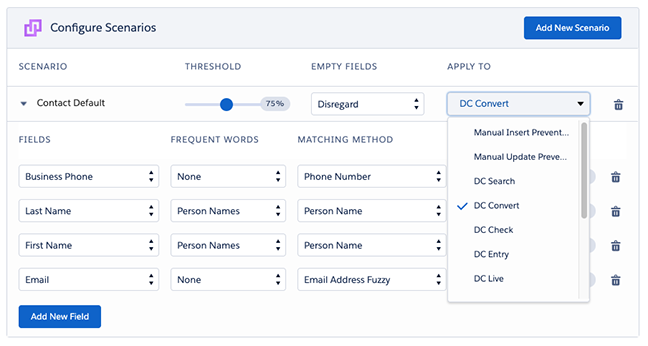
Apply a scenario to Deduplicate Convert
Make sure that a Contact and (Person) Account scenario is applied to Deduplicate Convert, to define how the component should search for a duplicate match from Lead to Contact and Account. In addition, make sure the relevant fields are mapped in the cross object configuration.