

Run a Deduplicate Job on Plauti Cloud
This is a paid feature. Read more about the billing of Deduplicate Jobs on Plauti Cloud in Usage & Billing.
Preparing the job in Plauti Deduplicate
Deduplicate Jobs are started from Plauti Deduplicate in Salesforce or MS Dynamics. At the Processing Options, select Run on Plauti Cloud to run a job on Plauti Cloud.
In Salesforce or MS Dynamics, go to Plauti Deduplicate > Deduplicate Job.
Click New Job.
Configure the job in the 'Select Records' and 'Job Options' windows.
At 'Processing Options', select Run on Plauti Cloud.
Click Start.
The job is now added to the job overview in Plauti Deduplicate, but not yet started. Its status shows 'Holding' or 'Waiting'.
Manually starting the job at Plauti Cloud
Roles for starting a job
To start a job on Plauti Cloud, you need one of the following Plauti Cloud roles:
PD User or Owner
Learn more about assigning roles in Team Management.
To start the job on Plauti Cloud, go to Plauti Cloud.
Go to Plauti Cloud at https://cloud.plauti.com. Log in if you are not automatically forwarded.
In the left menu, under Plauti Deduplicate, click Jobs.
Find the job you just created and click Start Job.
In the pop-up, check the confirmation data and click Start.
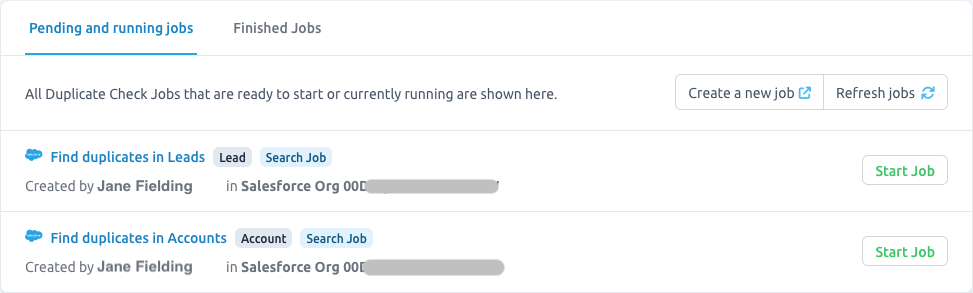
In the Pending And Running Jobs overview, the progress of the job is shown. Note that it might take a few minutes before the job is started.
Once the job is finished, it will show up on tab Finished Jobs. It will also be shown in Deduplicate Job in Salesforce or MS Dynamics, where you can process it further.
Automatically starting jobs at Plauti Cloud
Instead of needing to switch to Plauti Cloud to start a job, you can also configure Plauti Cloud to start jobs automatically. Read more here.
No jobs visible
If you don't see any jobs under Pending And Running Jobs, or not the jobs you expected:
- Click Refresh Jobs at top right to refresh the Pending And Running Jobs overview
- Make sure your org is connected at Connections (bottom left)
- Make sure the user you used to create a Connection to your org has access to all Apex classes.
- Start a new job via Create a new job at top right. You are forwarded to Plauti Deduplicate in Salesforce where you can set up a new job. Follow the steps under 'Preparing the job in Plauti Deduplicate' at the top of this page.