
PlautiPlauti Success Hub
⌘K
Log In
Home Documentation Release notes Developer
Salesforce
Plauti Deduplicate
How-To's
Usage Guide
Find and Process Duplicate RecordsDeduplicate LiveDeduplicate Job - Find Duplicates in BatchDeduplicate Job FiltersDeduplicate Job OverviewStart a Cross Object jobSchedule a Deduplicate JobScheduled Job OverviewDeduplicate Job Results OverviewDeduplicate Results page Groups FilterOverall Job ResultsSharing Deduplicate Job ResultsManual MergeAuto MergeSharing a merge pageSet for MergeDeduplicate ConvertAuto ConvertDeduplicate SearchDeleting JobsExport Deduplicate Job ResultsDeduplicate CheckAPI Single Insert / UpdateDiscard RecordsLocation of Plauti Deduplicate Data Processors
Videos
Installation Guide
Setup guide
Development guide
Flow Actions
Plauti Cloud, Desktop, and Server
Release Notes
Troubleshooting
Plauti Context
Plauti Assign
Plauti Verify
Plauti Restore
Plauti Manipulate
Plauti Data Management
Plauti Agentforce
Dynamics 365
Plauti Deduplicate
Apps
Plauti Apps
  1. Home
  2. Documentation
  3. Salesforce
  4. Plauti Deduplicate
  5. Usage Guide
  6. Sharing a merge page

Sharing a merge page

Share a specific merge page via tasks, email or by sharing a direct link.

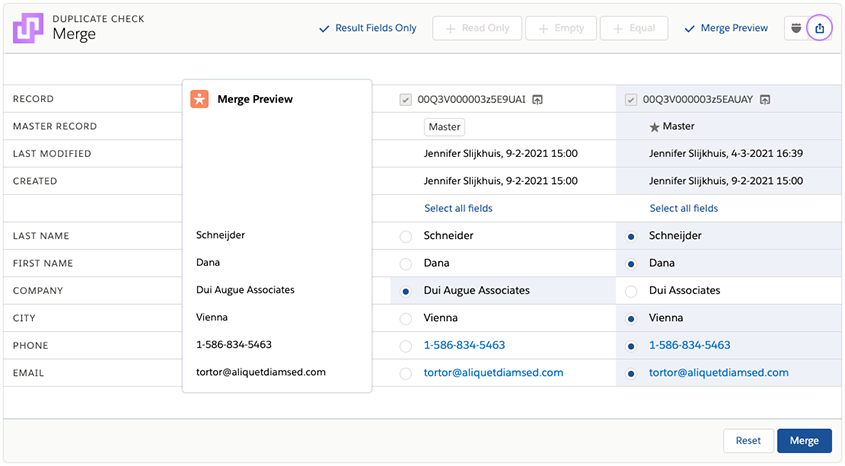
To share a merge page with another Salesforce user, enter the merge page you want to share. Then click the share icon at the top-right of your screen.
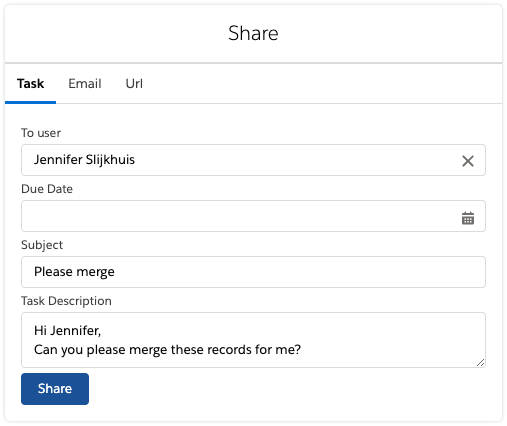
In the modal that pops up, choose to share the merge page via Task, Email, or by copying a direct link (URL).
Did you know that you can also share entire results lists after running a Deduplicate Job? Read more.

Plauti
PrivacyTermsContact Support

© 2026 Plauti B.V. All rights reserved.