

Integrate Plauti Deduplicate with Plauti Verify
Last updated
Plauti Verify can be integrated with Plauti Deduplicate. Validate your records, and at the same time check whether the record you're creating or updating already exists in Salesforce.
To have Plauti Deduplicate work together with Plauti Verify, use the Verify page layout for Verify Entry, then apply a Deduplicate scenario to Verify Manual Insert and Update Prevention.
1 Apply Verify Entry
You can only configure one Entry page. To use both Deduplicate and Verify when creating or editing a record, do not use Deduplicate Entry.
Instead, set up the Verify Entry page as described in How to deploy the Plauti Verify Entry page (in Salesforce Lightning).
2 Apply a Deduplicate scenario to Verify Manual Insert and Update
- In Plauti Deduplicate, go to Deduplicate Setup.
- At left, at Object Configuration, configure the Object you are using Plauti Verify for.
- At the Scenarios tab, edit the Scenario you want to use to detect duplicate records in Plauti Verify.
- In the scenario configuration, at Apply To, select Verify Manual Insert Prevention and Verify Manual Update Prevention.
Click Save. - Repeat for other Objects if needed.
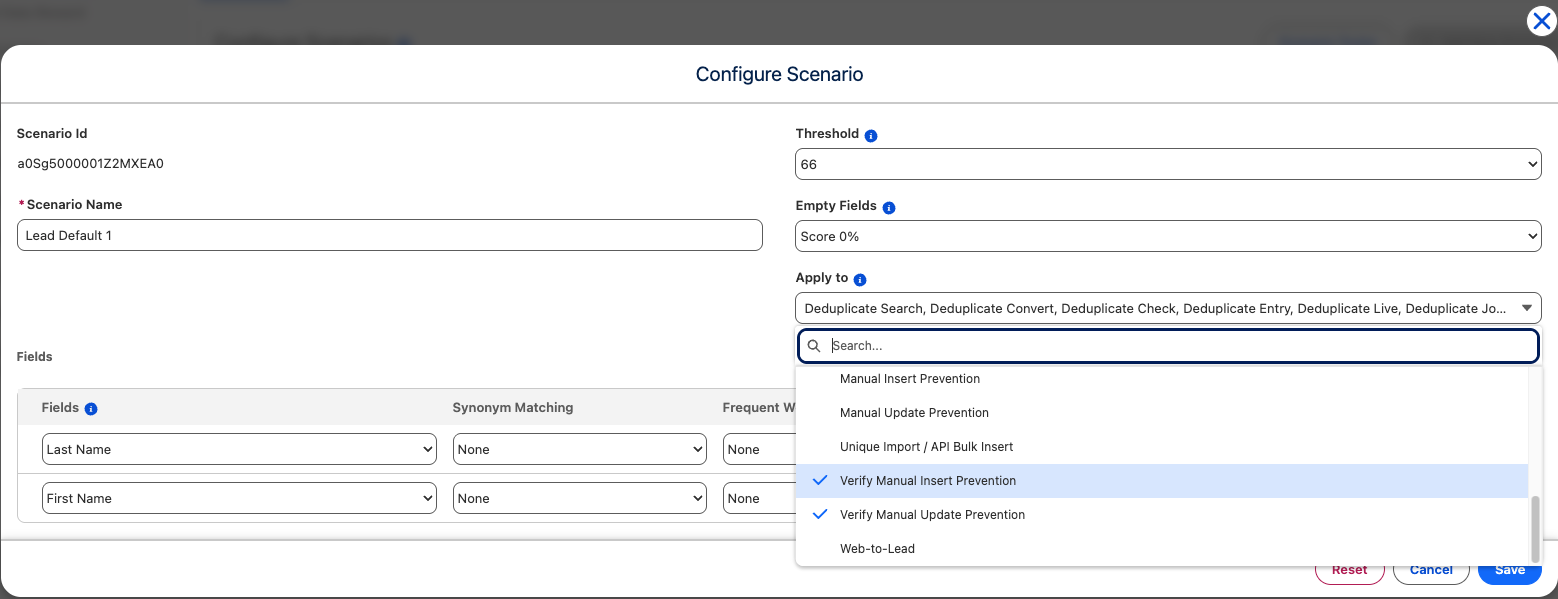 Apply a Deduplicate scenario to Verify Manual Insert Prevention and Verify Manual Update Prevention
Selecting Verify Manual Insert Prevention will trigger Plauti Deduplicate's prevention feature when creating a new record.
Selecting Verify Manual Update Prevention will trigger Deduplicate prevention when updating an existing record.
Want to find out more about Plauti Deduplicate and scenarios? Visit the Deduplicate section of the knowledge base.