

Character Length Analysis
Character Length Analysis measures the minimum, maximum, and average character length of text field values, and flags statistical outliers.
The Character Length Analysis scans text-based fields, such as standard text, Description, custom text, email, URL, phone, or encrypted text fields, and calculates the minimum, maximum, and average character length of the values in each field. Only records with a non-blank value are included. It then flags outliers: values whose character length deviates more than 2 standard deviations from the field's average length.
Use this analysis to spot inconsistent data entry, for example one record with a 10,000-character description while most are under 500, or a subset of records with suspiciously short, low-information values.
Character Length Analysis or Character Length Distribution?
Character Length Analysis focuses on outliers and inconsistency within a field, using standard deviations to flag values that are unusually short or long. If you instead want to understand the overall shape of length usage, for example which length ranges most records fall into, use Character Length Distribution. The two are often used together: Character Length Analysis catches the outliers, Character Length Distribution helps you set realistic target lengths and maximum limits.
Configuration
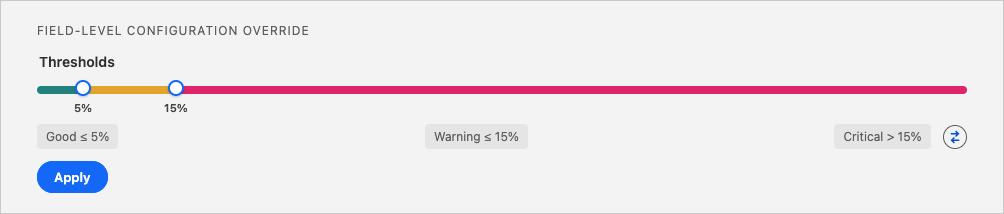
Set a threshold for what counts as a good, warning, or critical outlier rate. Since this analysis concerns detecting outliers, you'll most likely want a low outlier rate. So, for example, set the threshold for Good at 5%, Warning at 15%, and Critical anything above 15% of analyzed values flagged as outliers.
Detailed Job Results
In the Job Results of the analysis, outliers are values whose character length deviates more than 2 standard deviations from the field's average length. Blank values are excluded from all calculations.
The Outlier Rate per Field bar chart ranks analyzed fields by the percentage of their values flagged as outliers, so you can see at a glance which fields have the most inconsistent value lengths. Hover over a field's bar to see more details.
Below it, the Character Length Analysis Results table lists per field: Max Length (the field's schema-defined maximum length, not an analysis result), the number of records with a value ( # Records with Value), the Average Field Length, Min Value Field Length, Max Value Field Length, the number of field length outliers ( # Outliers Field Length), and the percentage of field length outliers ( % Outliers Field Length) marked with its configured threshold color.
Key Insights
- Inconsistent data entry: mixed very-short and very-long values in the same field often mean some users or integrations provide detailed text while others provide almost nothing.
- Unexpectedly long values: outliers near the top of the range can be copy-pasted email threads, logs, HTML, or system dumps that don't belong in the field.
- Unexpectedly short values: outliers near the bottom can be placeholder text like "OK" or "Test," punctuation only, or other low-information entries.
- Template and process quality: a high outlier rate on a field with a defined template or form often means users are bypassing it or the guidance isn't clear.
- Field configuration feedback: outliers that routinely hit or approach the field's Max Length may signal the field needs a different storage approach or a larger configured length.
Recommended Actions
| Scenario | Actions |
|---|---|
| High outlier rate on a key field | - Inspect sample outlier records to see whether long outliers are pasted logs, emails, or HTML for example, and whether short outliers are placeholder or test data. - Clean up obvious bad data. - For system-generated content, move large payloads to notes, related records, or file storage instead of a single text field. - Re-run the analysis after cleanup to confirm improvement. |
| Mixed length patterns on a field that should be consistent | - Introduce or improve a text template so users know what content is expected. - Add help text clarifying the expected format or length. - Add a validation rule or Flow logic to block unreasonably long values and optionally warn on very short ones. |
| Outliers routinely near the field's Max Length | - Confirm whether the field needs a longer configured length or a different storage mechanism. - Consider splitting the field or moving large content to a related object. |
| Preparing a field for automation or AI | - Flag or cap extreme lengths before feeding the field into AI models or NLP. - Consider derived fields, such as a checkbox for records within a reasonable length range and one for flagged outliers, to prioritize cleanup and exclude extreme values from training sets. - Combine with Character Length Distribution to confirm both length and structure are consistent. |