

Negative Value Analysis
Negative Value Analysis identifies numeric fields that contain values less than zero.
The Negative Value Analysis scans numeric fields such as Number, Currency and Percent fields, and calculates for each field the percentage of records with a negative value. Zero is treated as non-negative, and only records that actually contain a value are included in the percentage calculation.
Use this analysis to catch negative values in fields where they shouldn't logically occur (such as Price or Quantity), and to distinguish those data errors from fields where negative values are a legitimate part of the business logic (such as a balance delta or refund amount).
Configuration
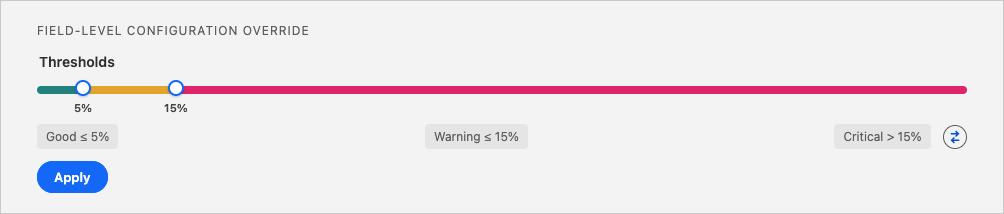
Set a threshold for what constitutes a good, warning level, or critical negative value rate. Depending on the field you're analyzing, you'll probably want to have as few negative values as possible. This would mean for example a good negative value rate is 5% or less, warning level would be between 5-15%, and anything over 15% empty would be critical.
Detailed Job Results
The Negative Share per Field bar chart shows per field the percentage of negative values, so you can quickly see which fields have the highest proportion of negative values. Hover over a bar to see more details.
Below, the Field Details table lists for each field the number of records with a value ( # Records with Value), the number of records with a negative value ( # Records with Negative Value), and the percentage of records with a negative value ( % Records with Negative Value) marked with its configured threshold color (green = Good, amber = Warning, red = Critical).
Key Insights
- Business rule violations: negative values in fields that are logically non-negative, such as Price, Quantity, or List Price, usually point to a data entry or integration issue.
- Legitimate vs. erroneous negatives: some fields, like a balance delta or margin, are expected to go negative. Distinguish those from typos (for example, "-1000" instead of "1000") or an integration passing values from a source system that uses a plus/minus sign to represent direction (for example, a decrease as
-50), where the target field only expects a positive value. - Process gaps: a persistent share of negative values can mean forms or integrations aren't enforcing a non-negative constraint, or that users are working around a missing credit/adjustment process by entering negative line items.
Recommended Actions
| Scenario | Actions |
|---|---|
| Fields that should never be negative (e.g. Price, Quantity, License Count) | - Confirm the field is non-negative by business rule. - Investigate example records for typos, or for an integration passing values from a source system that uses a sign to represent direction. - Add a validation rule or flow check enforcing field >= 0.- Correct existing negative entries or move them into a proper credit or adjustment mechanism. |
| Fields where negatives can be valid (e.g. Delta, Margin, Profit/Loss) | - Define the expected range for the field, including how far negative it can reasonably go. - Add validation for impossible extremes. - Document the sign convention so other admins and integrators know what a negative value means. |
| Protecting reports and dashboards | - Confirm whether valid negatives (losses, refunds) are handled explicitly in your reports. - Create a filter for suspicious negatives per field. - Exclude or correct those records before they reach executive dashboards or forecasts. |
| Preparing data for AI or scoring models | - Flag or clean invalid negatives before model training. - Consider deriving a feature such as "Has Negative History" instead of feeding the raw negative value into the model. |