The Power Automate dedupe flow that always breaks, and what it actually costs you per project

August 17, 2026
Reading time: 7 minutes

You built the flow. It worked. Then it didn't.

The setup made sense at the time. Native duplicate detection wasn't catching records coming in through the integration, so you built a Power Automate flow to fill the gap. Trigger on record creation, retrieve potential matches, compare field values, flag or merge if a match is found. Clean, straightforward, done in an afternoon.

It worked fine in testing. It worked fine in the first two weeks after go-live. Then a schema change came through. Or the client added a custom entity. Or the flow hit a throttling limit during a bulk sync and silently stopped processing. By the time anyone noticed, there were three weeks of undetected duplicates sitting in the environment.

If this sounds familiar, you're not alone. The Power Automate deduplication flow is one of the most common workarounds in the Dynamics 365 CE consultant toolkit, and one of the most reliably fragile ones. Not because Power Automate is a bad tool, but because deduplication is not the problem it was built to solve.

Why consultants reach for Power Automate

The appeal is real. Power Automate is already in the stack. It requires no additional licensing, no deployment pipeline, no IT approval process. A consultant who knows the platform can build a working deduplication flow in a few hours. For a client who needs something running before go-live and doesn't want to hear about additional tools, it's an easy yes.

It also looks good in a demo. Trigger fires, record gets checked, duplicate gets flagged. The client sees the logic, understands it, and signs off. What happens six months later, when the flow breaks in a way that isn't visible in the interface, is a problem for future-you.

How the flow breaks, and why it's hard to catch

Power Automate deduplication flows break in characteristically quiet ways. The flow doesn't throw an error the client will notice. It just stops doing what it was supposed to do.

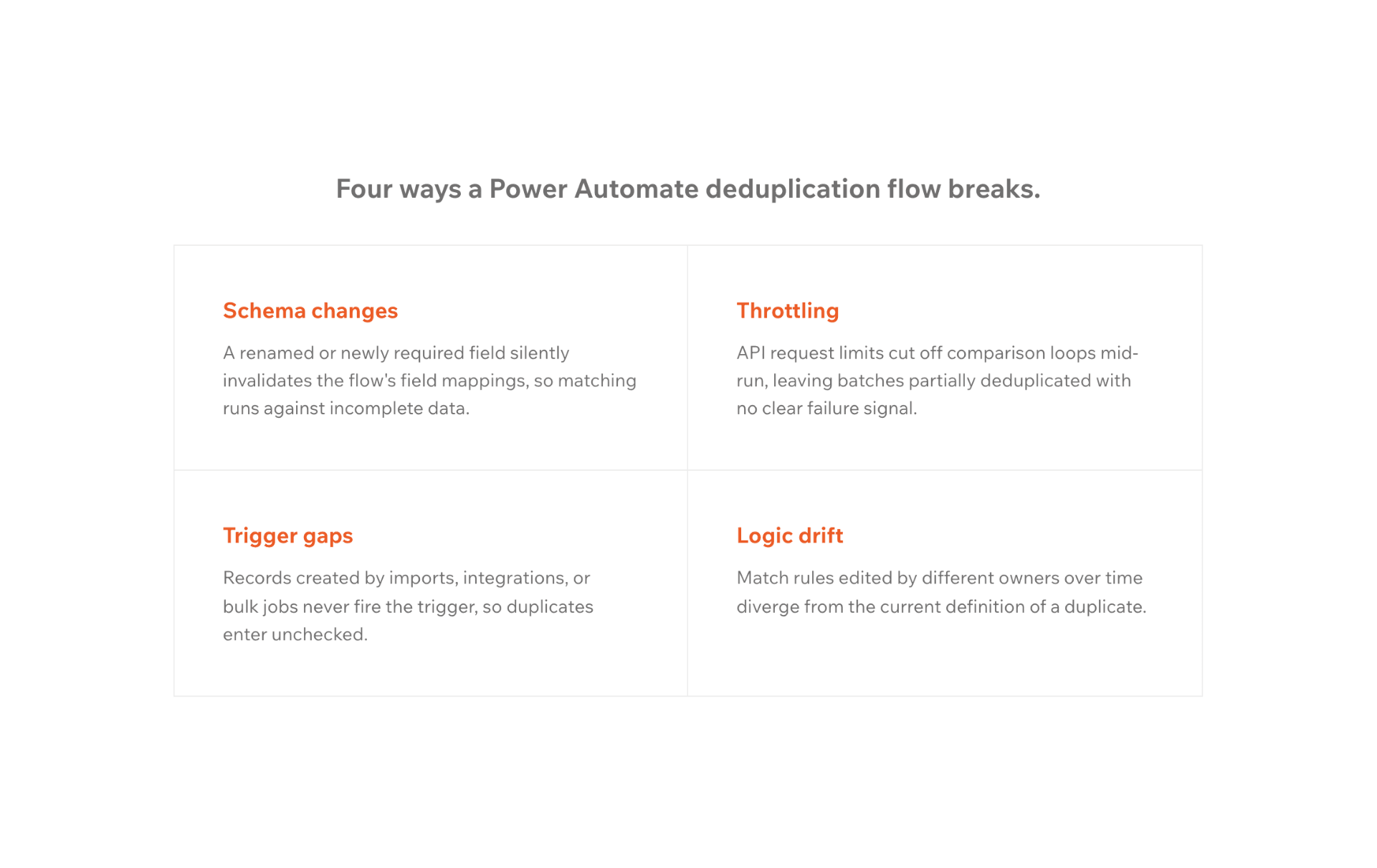
Schema changes. The flow references specific fields on the entity. When the client's team adds or renames a field, which happens routinely during the first few months post-go-live, the flow either breaks silently or starts comparing the wrong values. Nobody gets an alert. The duplicates accumulate.

Throttling during bulk operations. Power Automate has API call limits. During a bulk import, a large integration sync, or a data migration from a connected system, the flow gets throttled. Records arrive faster than the flow can process them. Some get checked; others don't. The ones that don't are exactly the ones most likely to be duplicates, because bulk operations typically involve data from external systems where the deduplication problem is most severe.

Trigger gaps. The flow triggers on record creation through the UI or specific connectors. Records arriving via the Web API, Dual-Write, or a connector that wasn't configured when the flow was built don't trigger it. The flow is running; it's just not running on the records that matter most.

Logic drift. The matching logic that made sense at the start of the project, match on email, match on company name plus phone, starts producing false positives as the client's data model evolves. Someone adjusts the logic. The adjustment introduces a new edge case. The flow starts merging records it shouldn't, or missing duplicates it should catch. Nobody notices until a client calls about a missing contact.

Maintenance dependency. The flow was built by the consultant who knew the data model at project time. When that consultant moves to a different engagement, the institutional knowledge goes with them. The next person who has to debug the flow is working from a black box.

D365 CE Power Automate 2

What it costs per project. The numbers nobody tracks

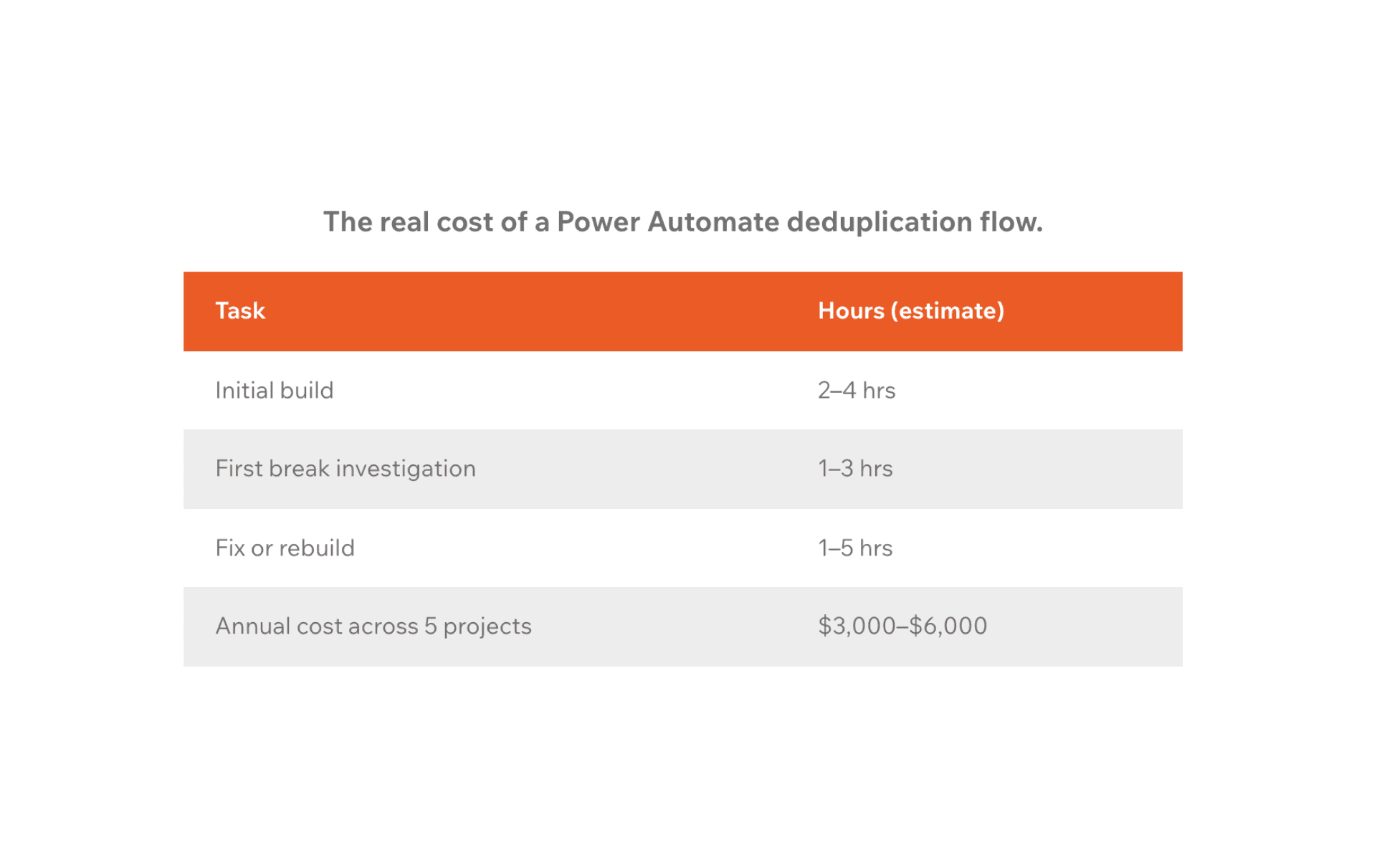
The direct build cost is low: two to four hours of a consultant's time to build and test a basic deduplication flow. That's the number that gets put in the project estimate, and it's roughly accurate for the initial build.

Everything after that is where the cost accumulates, and where it stops appearing on timesheets.

First break investigation: when the flow stops working and someone notices, diagnosing the cause takes one to three hours. Finding where the logic broke, tracing it back to a schema change or a throttling event, and deciding whether to fix or rebuild.

Fix or rebuild: depending on how badly the flow broke and how much the data model has changed, a fix takes one to two hours. A rebuild takes three to five. On a project with a complex entity model, a rebuild is the more common outcome.

Duplicate cleanup: the records that accumulated while the flow was broken still need to be addressed. A bulk detection job, manual review, or scripted merge; each takes time proportional to how long the flow was broken before anyone noticed.

Repeat: the average Power Automate deduplication flow breaks two to three times in its first year of operation. Each break follows the same investigation-fix-cleanup cycle.

At a conservative billing rate of $100 per hour, a flow that breaks twice in the first year costs $600 to $1,200 in unscoped remediation work, on top of the initial build cost. On a fixed-fee project, that comes out of margin. On a time-and-materials project, it's an awkward conversation with the client about why deduplication keeps needing attention.

Across five projects in a year, the remediation cost for Power Automate flows alone sits between $3,000 and $6,000 for a workaround that was chosen specifically because it looked like the low-cost option.

D365 CE Power Automate 3

The deeper problem: it's the wrong tool for the job

Power Automate is a workflow automation platform. It processes events, triggers actions, and moves data between systems. It does those things well.

Deduplication is a data integrity problem. It requires matching logic that runs at the data layer, coverage across every entry point into Dataverse, and reliability that doesn't depend on trigger configuration, API limits, or the availability of a specific connector. Power Automate wasn't designed to provide any of those things, and the gaps show up exactly where they hurt most: during high-volume operations, after schema changes, and on entry points the flow wasn't built to cover.

The flow works until the data volume grows, the schema changes, or a new integration comes online. On a live Dynamics 365 CE environment, all three of those things happen routinely.

What the alternative looks like

A deduplication layer that runs inside Dataverse, at the platform level, not the workflow level, doesn't have trigger gaps, doesn't get throttled during bulk operations, and doesn't break when a field gets renamed. It covers all entry points regardless of how the record arrived, works on standard and custom tables, and doesn't require a consultant to maintain matching logic as the client's data model evolves.

Plauti Deduplicate for Dynamics 365 CE installs from Microsoft Marketplace and runs entirely within the client's Dataverse environment. Configuration is done once at implementation, matching rules, merge logic, and field survivorship, and applies consistently across every entry point from that point forward. There's no flow to maintain, no throttling ceiling to manage, and no silent failure mode that accumulates duplicates before anyone notices.

For the project budget, the practical difference is that the deduplication workstream has a known, fixed cost at implementation rather than a recurring remediation cost that shows up unpredictably throughout the project lifetime.

Before you build the next flow

The next time the deduplication conversation comes up on a project, it's worth asking whether the Power Automate flow is the right answer or the familiar one.

If the client's environment is relatively simple: a handful of standard entities, no bulk integrations, minimal ongoing data volume. A well-scoped flow might hold. But if the project involves bulk imports, Dual-Write, a custom entity model, or any integration that's likely to grow, the flow will break. The question is whether you'd rather scope that cost upfront or absorb it later.

To see how other Dynamics 365 CE partners have replaced the flow with something that doesn't need maintaining, book a 30-minute walkthrough with the Plauti team. The conversation is worth having before the flow goes into the next project plan.

Frequently Asked Questions (FAQ)

Why does my Power Automate deduplication flow keep breaking in Dynamics 365 CE?

Power Automate deduplication flows typically break due to schema changes that invalidate field references, API throttling during bulk operations that causes records to be skipped, or trigger gaps that leave certain entry points uncovered

Because these failures are often silent, the flow doesn't throw a visible error, and duplicates accumulate before anyone notices the problem.

How much does it cost to maintain a Power Automate deduplication flow in Dynamics 365 CE?

The initial build cost is low: typically, two to four hours. The ongoing cost is harder to predict. Each break requires one to three hours to diagnose, one to five hours to fix or rebuild, and additional time for duplicate cleanup. A flow that breaks twice in its first year costs $600 to $1,200 in unscoped remediation at a $100/hour rate, not counting the cleanup work. Across multiple projects, this adds up to a significant recurring cost for a solution that was chosen because it looked inexpensive.

Does Power Automate work for deduplication in Dynamics 365 CE?

Power Automate can handle basic deduplication scenarios under controlled conditions. It becomes unreliable at scale: during bulk imports, large integration syncs, or when the client's data model evolves post-go-live. It also doesn't cover entry points that weren't configured when the flow was built, including Web API inserts and Dual-Write syncs. For implementations with ongoing data volume or multiple integration entry points, a native Dataverse deduplication layer is more reliable.

What is the alternative to a Power Automate deduplication flow in Dynamics 365 CE?

A deduplication layer that runs natively inside Dataverse covers all entry points, UI form saves, Web API calls, bulk imports, integration syncs, without depending on trigger configuration or being subject to API throttling. It applies consistent matching and merge logic across standard and custom tables, configured once at implementation rather than maintained per-project. For practices running multiple migrations a year, this converts a variable recurring cost into a predictable one-time implementation step.

Hungry for more?
View resources