Skip to content

Web API inserts bypass D365 duplicate detection by default. Here's what to do about it

  • Dynamics 365
  • Deduplication
Web API Inserts Bypass D365 Duplicate Detection. Photo by Maranda Vandergriff on Unsplash

You migrate 40,000 contacts into Dynamics 365. Your duplicate detection rules are on, and you tested them: create a contact with a matching email address in the UI, and the warning fires exactly as expected.

Then the real migration runs. Or the integration sync kicks off, or Dual-Write starts pushing vendor records from Finance & Operations. You're staring at 6,000 duplicates that your rules should have caught. Nothing is misconfigured. This is how it works by default.

Why duplicate detection doesn't fire on Web API calls

When a record is created or updated through the Dynamics 365 Web API, duplicate detection does not run unless the request explicitly opts in.

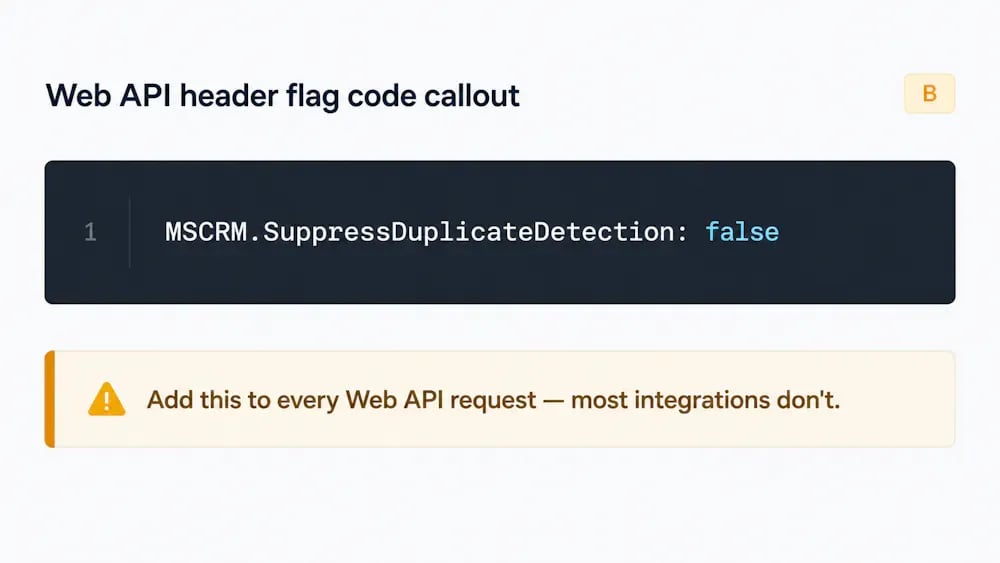
The mechanism is a request header: MSCRM.SuppressDuplicateDetection: false.

Setting that header to false tells Dataverse to run duplicate detection on the call. When the header is absent, the default behavior is the same as setting it to true: detection is suppressed.

Most integrations don't set this header: Dual-Write, KingswaySoft imports, Power Automate's Dataverse connector (depending on how the action is configured), and most custom Web API clients built in-house. Unless a developer explicitly added the header, duplicates come in silently.

This is documented behavior, not a bug. Microsoft suppresses detection by default to improve API performance, a reasonable trade-off for a general-purpose API, and the gap that surfaces two weeks before a CRM migration's go-live.

Where this shows up on real projects

  • Dual-Write sync. Dual-Write pushes records between Dynamics 365 CE and Finance & Operations through a continuous sync. Its Web API calls don't set SuppressDuplicateDetection: false. The result: duplicate vendor and customer records accumulate silently, even when detection rules are configured correctly. One Dynamics 365 consultant put it plainly: "I set up duplicate detection rules, but it does not help." That's not a misconfiguration. It's the default behavior.
  • KingswaySoft and SSIS imports. Bulk migration tooling typically writes records through the Web API in batches. Unless the connector is explicitly configured to pass the detection header, duplicates from the source system land untouched.
  • Power Automate's Dataverse connector. The Add a new row and Update a row actions don't surface duplicate detection as an obvious option. Records created through automated flows bypass detection unless the flow is explicitly built to handle them.
  • Custom Web API clients. An in-house integration, a custom sync from a legacy ERP, a marketing automation connector, or a third-party data feed inherits the same default. If the developer didn't know about the header, detection isn't running.
  • CreateMultiple and UpdateMultiple. These newer message types, introduced to improve bulk write performance, follow the same suppression default. Using them for high-volume imports gets you the performance gain and the same duplicate detection gap.

The fixes you can apply today, and where each one runs out

Set the header in the integration layer

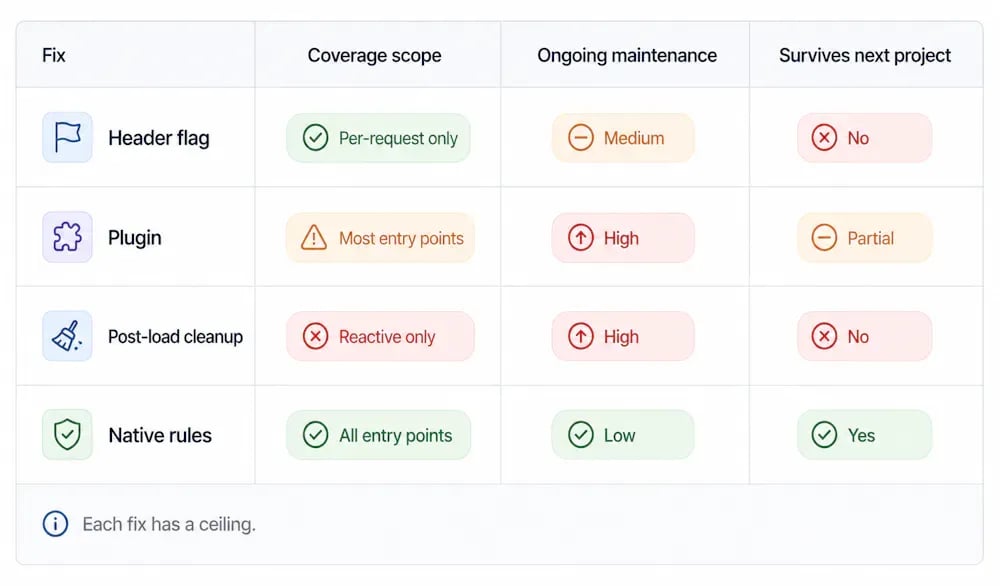
If you control the integration or migration tool, adding the MSCRM.SuppressDuplicateDetection: false header to each Web API request is the most direct fix. For KingswaySoft, that's a connector-level setting. For custom clients, it's a one-line header addition.

Where it runs out: you need to control and configure every integration individually. Five data sources means five places to get it right, and the next project starts from zero again. It also only covers entry points you know about at project time. The integration nobody scoped for shows up after go-live.

The header has another limit worth knowing. When SuppressDuplicateDetection is set to false, a detected duplicate makes the API call fail: the incoming record is rejected outright. If your integration is pushing updated data onto existing records, a contact's new phone number, a refreshed account address, this mechanism discards that data instead of merging it. For any use case that combines enrichment with deduplication, the header flag is the wrong tool.

Write a plugin on the Create/Update message

A server-side plugin registered on the Create or Update message can enforce duplicate detection logic regardless of how the record was created. That gives you coverage that doesn't depend on the calling client setting the right header.

Where it runs out: plugins are per-entity. A plugin written for Contact doesn't cover Account, Lead, or any custom table. A typical CE implementation with custom entities means writing and maintaining several plugins, then deploying and managing them across client environments. When the client upgrades or customizes the org, the plugin becomes something you own.

Post-load cleanup scripts

Run a bulk duplicate detection job after the migration completes, then merge what it finds, manually or by script.

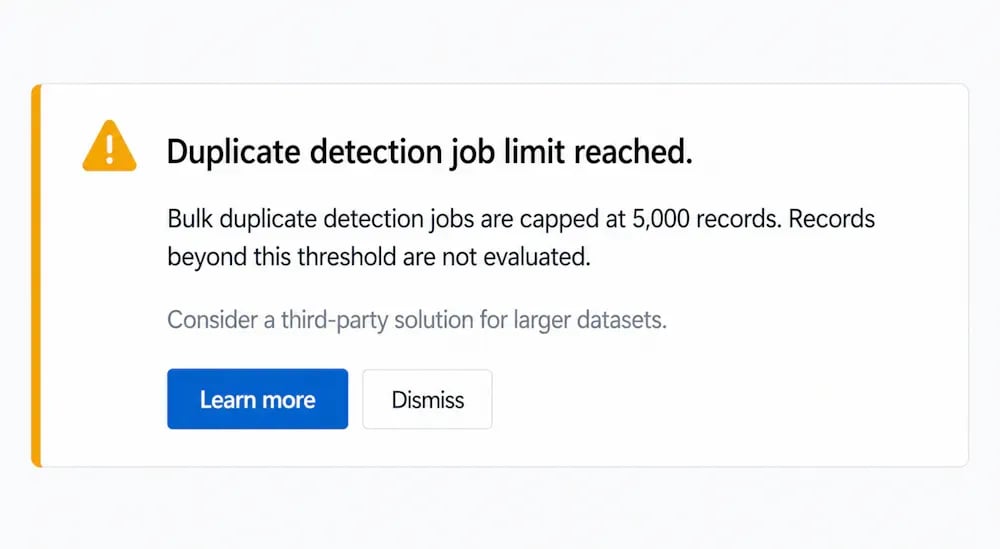
Where it runs out: Dataverse's native bulk duplicate detection job caps at 5,000 records. A mid-market migration hits that ceiling before it's touched most of the dataset, which means running the job in batches, tracking what's been processed, and hoping nothing new arrived between runs. It's a cleanup operation, not a prevention strategy, and it does nothing about duplicates that arrive after go-live through ongoing integrations.

Native duplicate detection rules

Native rules work well for what they were built for: catching duplicates entered through the Dynamics 365 UI. They fire reliably on form saves. They also have a built-in bypass: the Ignore and Save option lets any user dismiss the warning and save the record anyway, with no enforcement behind it.

Where it runs out: native rules don't fire on Web API calls by default, and they don't cover bulk imports or integration syncs without an explicit opt-in at the integration level.

The pattern underneath all of this

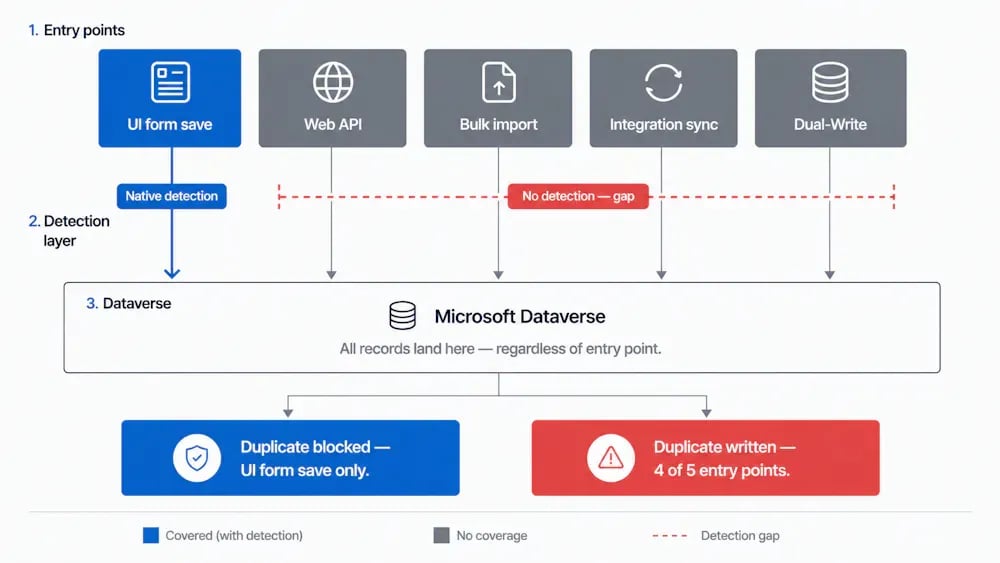
Every entry point into Dataverse is a separate duplicate-prevention problem.

Native duplicate detection was built for the UI: a user fills in a form and hits save. That's the scenario it handles reliably. The Web API, bulk imports, integration syncs, and automated flows are architecturally separate entry points, and under the current model each one needs its own fix.

A single-system migration with no integrations might get by on the header flag or a post-load cleanup job. CE implementations rarely look like that: most involve a legacy CRM, at least one integration running at go-live, and custom entities nobody's written a plugin for. Every entry point that gets missed becomes a cost, one that lands at go-live or three weeks after, when the client calls.

What a Dataverse-level prevention layer looks like

Plauti installs directly from Microsoft Marketplace and runs entirely inside your Dataverse environment: no external access, no middleware, no data leaving the environment.

It checks for duplicates at every entry point, form saves, bulk imports, Web API calls, and integration syncs, without requiring each one to be configured separately. It works across every standard and custom Dataverse table, not just Account, Contact, and Lead, and there's no 5,000-record ceiling on bulk jobs.

For partners, that means the duplicate-prevention workstream gets scoped and handled once instead of re-solved with a different workaround on every project.

What to do next?

If you're mid-project and need to see the scope of what's come through, start with the bulk detection job to get a baseline, keeping the 5,000-record cap in mind. Then work back through the active integrations and check whether each one passes the detection header.

If you're at the architecture stage, build duplicate prevention into the integration design instead of treating it as a post-migration cleanup task.

Hungry for more?

Ready to take control?

With a product tour you can walk through the product yourself without installing anything, or book a demo for a guided look.