Skip to content
Monitor · Clean · Prevent · Act

Data you can trust
Inside Dynamics 365 CE

See what is wrong across your Dataverse entities, fix it at scale, and stop bad records from getting back in — so your reports, your automations and Copilot all work from data that holds up.

From workarounds to a working system

The workaround

  • Native detection flags an exact name match, then lets the user click save anyway.
  • Bulk detection jobs stop at 5,000 duplicate records.
  • Records created by an integration skip detection entirely, sometimes for months.
  • A dashboard shows the problem, then waits for someone to act on it.
  • Cleanups run pair by pair, and the backlog rebuilds between projects.

With PlautiPlauti

  • Checks fire at every entry point, including the ones native detection skips — and you decide per entity whether a duplicate warns the user or stops the save outright.
  • Bulk jobs run past that ceiling, on standard and custom entities.
  • Duplicate search runs on API insert, so integrations get checked like everyone else.
  • Monitor scores it, Clean fixes it — then re-run the check and show the number moved.
  • Merges run in bulk, and prevention keeps the backlog closed.

What you get in Plauti for Dynamics 365 CE

  • 16 automated data health analyses

  • Document your entities and fields

  • Trends and history (coming soon)

  • Find and merge duplicates in bulk

  • Exact and fuzzy matching, per field

  • Multiple matching scenarios per entity

  • Cross-entity matching across Lead, Contact and Account

  • Convert a lead into an existing customer

  • AI review of your matching scenarios

  • Master record and field merge rules

  • Auto merge above the score you set

  • Discard a false positive once, and for good

  • Duplicate warnings as users type

  • Duplicate search on API inserts

  • Run the largest jobs locally or in the cloud

  • An audit trail of every merge and convert

  • Runs natively in Dataverse

One lifecycle, inside Dataverse

Monitor, clean and prevent share one set of rules and one view of your environment.

  • Know where the mess is

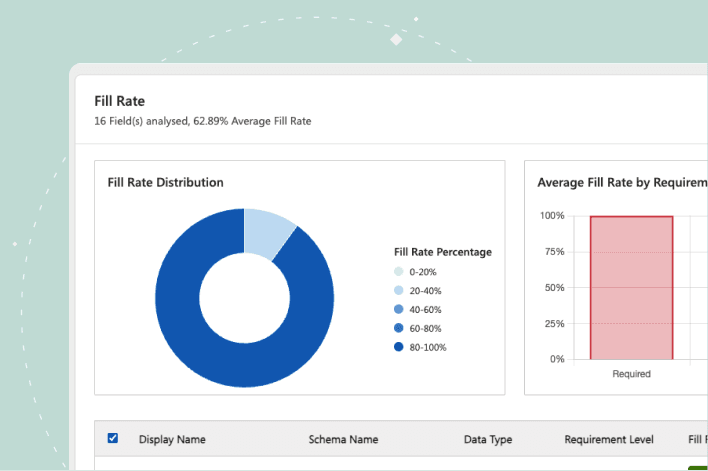
    Sixteen automated analyses run against the entity and fields you choose, scored green, amber or red against thresholds you set.

    • Fill rates, duplicate values, formats, dates and choice values.
    • Field-level results that stay put, not one-off job output.
    • A read you can take to leadership.
  • Close the duplicate backlog

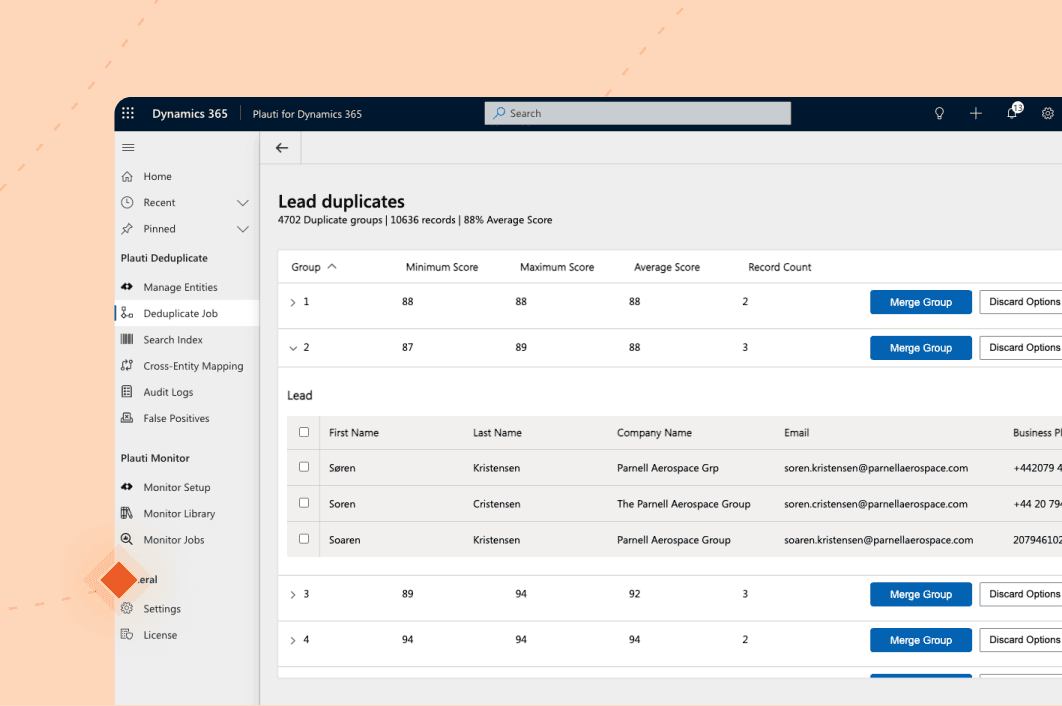
    Merge in bulk instead of pair by pair. Related records are re-parented to the surviving record instead of being orphaned.

    • Fuzzy matching, with the reason for every match visible.
    • Field-level rules decide what the surviving record keeps.
    • A side-by-side comparison before any manual merge.
  • Keep it from coming back

    The same rules run at every door: as users type, on save, on Quick Create, and on records arriving through the API.

    • A warning at the point of entry, with the matching records listed.
    • You decide per entity whether a match warns the user or blocks the save.
    • Account, Contact and Lead out of the box, plus any custom entity.
  • Nothing new for IT to review

    Day-to-day analysis, detection and merging happen inside your own Dataverse environment. Nothing merges unless you wrote the rule.

    • Installs from Microsoft Marketplace as a solution.
    • Uses your existing security roles and permissions.
    • No middleware and no separate login.

See it in Dynamics 365 CE yourself.

Two interactive tours — no install, no sales call.

More product tours

Data quality, in numbers.

  • 60%

    of AI projects will be abandoned through 2026 for lack of AI-ready data (Gartner, 2025)

  • $12.9M

    the average organization's annual cost of poor data quality (Gartner, 2020)

  • 5,000

    records: the ceiling on a native Dataverse bulk duplicate detection job

  • 16

    automated data health analyses, at no extra cost once installed

Frequently asked questions

Will this help before we roll out Copilot?

That is the usual reason teams start. Copilot does not work around messy data — it acts on it, answers from whichever duplicate it happens to pick, and writes more back into Dataverse. Monitor gives you a dated, defensible read on entity and field health before the rollout, and Clean and Prevent close the gaps it finds.

Can our implementation partner run this for us?

Yes, and many already do. Microsoft partners and consultants use Plauti on their own engagements: a data health check on day one to scope what a migration is really carrying, bulk merging to clear the backlog before go-live, and prevention left switched on at handover so the environment does not drift back. Because it installs from Microsoft Marketplace and runs inside your own Dataverse, the configuration your partner builds stays with you — the same rules and the same view, whether they keep running it or your team picks it up after handover.

Does Plauti move my data out of Dynamics 365?

Not for day-to-day work. The exception is large batch clean jobs, which are processed on dedicated infrastructure or locally, under a signed data-processing agreement.

Can I tell afterwards that a record was merged?

Yes. The surviving record carries a marker showing it was merged, so anyone working that record can see what happened, not only an admin reading an audit log.

What does it cost to check how healthy my data is?

Checking data health and documenting your entities and fields carry no extra cost once Plauti for Dynamics 365 is installed.
Ready to trust your Dynamics data?

Talk with one of our experts to see how that works for your use case.