
Guides
7 Steps to Audit Your Marketing Tech Stack
A tech stack audit finds which tools earn their subscription, which duplicate each other, and where your data quietly drifts out of sync. Seven steps, from setting goals to acting on the results.

Picking the right SaaS tool is only half the job. This chapter covers the six steps to implement it: standardizing your processes first, protecting data quality through the migration, training staff, testing before full rollout, and evaluating afterward.

Implementation is a plan for people and processes as much as it is for software. It touches every department that uses the tool, so a domino effect runs through the company when it changes — plan for that rather than being surprised by it.
SaaS tools cover very different jobs: CRM platforms, marketing automation, ERP, and more, each with its own rollout challenges. The six steps below apply across all of them.
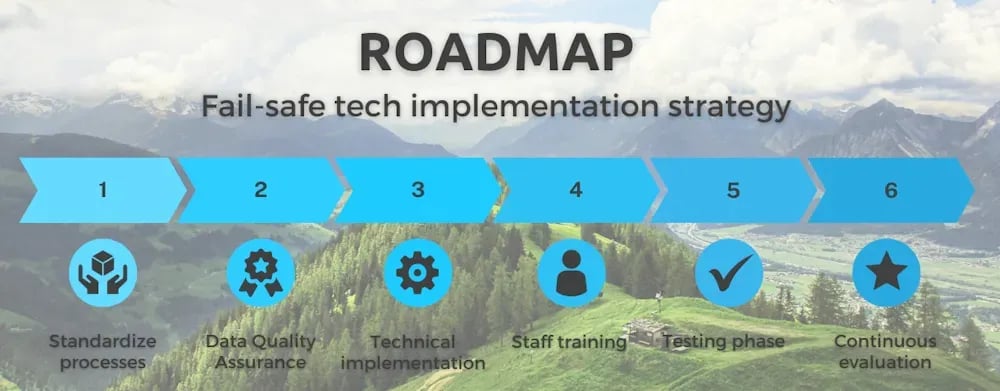
Break the rollout into stages with owners, goals, and timelines instead of treating it as one big-bang step. Set short-, medium-, and long-term milestones, and stay flexible — you'll likely need to adjust the plan as real usage surfaces issues the pilot didn't catch.
There's no point implementing new software on top of disorganized processes. Standardize them first, so staff know who to contact when something breaks. Most SaaS vendors offer implementation consultants — factor that support into your buying decision, not just the sticker price.
Use the standardization phase to cut sub-processes that don't add value and won't map cleanly onto the new tool. This is also the moment to finalize who owns what, if you haven't already.
Data quality determines whether decisions made with the new tool are worth trusting — the non-profit case study is one example of what that looks like in practice. What counts as "good" data shifts depending on which stakeholders rely on it, but accuracy and reliability let managers act on it without second-guessing. Bad data does the opposite: it raises operational costs and causes problems for whoever's downstream of it — see the ten dangers of bad data quality in Salesforce for specifics.
Before you touch the technical implementation, confirm the new tool won't disrupt the flow of clean data between systems and departments. Compatibility with your stack isn't enough on its own — the tool also needs to preserve, not break, the data quality you already have.
This step usually has the most vendor support behind it. The core of it is data migration: moving the data you want into the new system, often scattered across files, formats, and old tools. The longer a company's been operating, the messier that migration tends to be.
A clean database transfers far more easily than a messy one. This is the second reason data quality comes before technical implementation, not after it.

New software meets resistance by default — routine is comfortable, even when it's inefficient. Work with the people who'll actually use the new tool early, so they understand what it's for rather than being told to adopt it after the fact.
Train everyone involved from day one. Training aligns people to the same objectives, keeps performance consistent across the team, and builds the skills people need to actually use what you bought. Make training ongoing rather than a single kickoff session, and keep manuals available for staff who join later.
Even a well-built SaaS tool needs a period where old and new processes run side by side. Keep this phase short, and have people actively watching for errors and inconsistencies rather than assuming it'll be fine.
Make sure staff know what to do when something breaks — a clear communication channel for reporting anomalies matters more here than in almost any other step.
Good results in testing don't mean the work is done. Build in periodic reviews to collect feedback, fix what's not working, and roll in new ideas as the team's needs change.
Most SaaS vendors run their own scheduled and automated tests and ship fixes directly to the cloud instance, so many issues get solved without you needing to install anything. That doesn't replace your own review — it just means continuous evaluation is cheaper than it used to be.
Guides
A tech stack audit finds which tools earn their subscription, which duplicate each other, and where your data quietly drifts out of sync. Seven steps, from setting goals to acting on the results.
Guides
Millions of SaaS tools claim to be the best. Here's how to define your actual requirements, check governance and security, research your shortlist, and compare finalists before you commit.
Planning determines how the rollout affects processes and people, including who executes each activity. A well-planned implementation accounts for how support processes like sales, accounting, and marketing will change together, aiming for coordinated deployment across departments rather than each one moving on its own schedule.
Standardizing processes first ensures staff know whom to contact with questions or issues once the new tool is live. This phase involves cutting sub-processes that don't add value and updating internal processes so the rollout has something organized to attach to. Vendor consultancy can help with this preparation.
High-quality data lets managers and staff trust what the new tool shows them, leading to better decisions and lower operational costs. Before technical implementation, confirming the tool is compatible with your stack and won't disrupt the flow of clean data is critical to avoiding problems after go-live.
A testing phase lets old and new processes coexist briefly, so errors and inconsistencies get caught and corrected before the final rollout. It works best when it's short, staff are actively watching for problems, and there's a clear channel for reporting anomalies.
Continuous evaluation catches problems and captures new ideas as the team's needs change over time. Automated testing from most SaaS vendors, combined with your own periodic review, keeps the tool meeting your needs without requiring constant manual checking.
With a product tour you can walk through the product yourself without installing anything, or book a demo for a guided look.