
Guides
Salesforce Data Management Essentials
The first chapter of Mastering Salesforce Data: why Salesforce's CRM growth raises the stakes on data quality, and what counts as data purity and precision.


Even a well-run Salesforce org accumulates duplicates. Salesforce ships two native tools to deal with them, and they do different jobs.
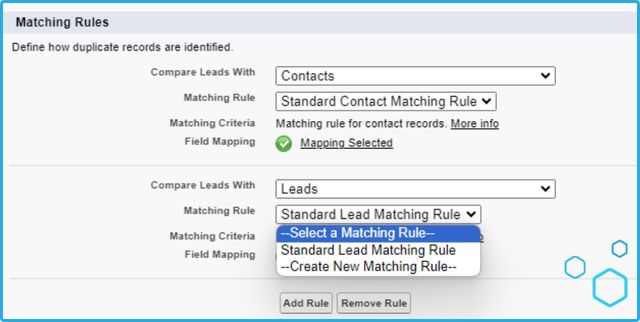
A Matching Rule defines what counts as a duplicate: the criteria used to compare two records, whether within one object (lead vs. lead) or across objects (lead vs. contact). A Duplicate Rule defines what happens once a match is found: block the save, warn the user, or let it through. The two work together — the Matching Rule decides "is this a duplicate," the Duplicate Rule decides "now what."
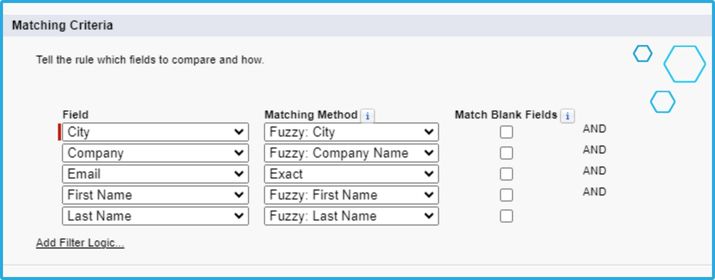
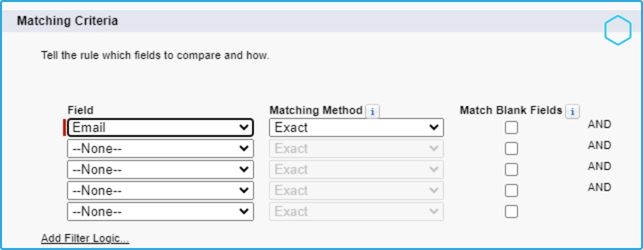
A matching rule compares fields between two records using an equation you define — for example, treating two leads as a match if their email fields are close enough. Once active, it applies one or more match keys to existing records: only records sharing a match key get compared, which is what keeps performance manageable at scale. Records with no shared match key are never compared, so a badly chosen key can hide duplicates from the rule as easily as a well-chosen one can find them.
To identify duplicates based on email similarity:
Activate the rule once the criteria are set.

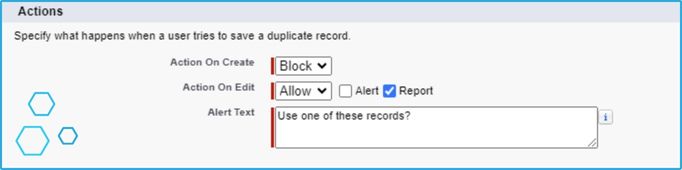
A Duplicate Rule acts on what its paired Matching Rule finds. It can notify a rep that a possible duplicate exists, or block the record from saving outright, regardless of the user's permissions. Point it at a Matching Rule and it has everything it needs to act.
To block a new contact when one with the same email already exists:
Beyond rules, Salesforce gives you a few more levers:
For a small org, this is a workable toolkit. It runs into a wall once the data volume or the complexity of the matching grows.
Salesforce's native tools are a real foundation, not a placeholder — they can run a small org's duplicate management end to end. The limits above are where larger, more complex orgs start looking at a dedicated tool instead, which is what the rest of this guide covers.
Next up: two more free Salesforce tools worth knowing before you go looking outside the platform — the Data Loader and the Data Import Wizard.
Guides
The first chapter of Mastering Salesforce Data: why Salesforce's CRM growth raises the stakes on data quality, and what counts as data purity and precision.
Guides
A field guide to Salesforce's two native import tools: the Data Import Wizard for smaller jobs, the Data Loader for bulk work, and where each one runs out.
A Matching Rule defines the criteria for comparing two records and deciding whether they're a duplicate. A Duplicate Rule defines what happens once a match is found — warn the user, or block the record from saving.
Go to Setup, then Matching Rules, and define what to compare, such as leads against contacts. Choose a matching method per field: Fuzzy Matching for near-misses like typos, or Exact Match for identical values only.
Five active duplicate rules per object. You can have five for contacts and five for accounts, but no more than five for any single object.
Three records per merge request. Five duplicate records means running the merge at least twice.
Once matching needs to combine multiple conditions, span objects at scale, or run faster than the batch and API limits allow — at that point, Apex code or a third-party deduplication tool covers what the native rules can't.
With a product tour you can walk through the product yourself without installing anything, or book a demo for a guided look.