Skip to content

Monitor, Clean, Prevent, Act: the Salesforce data quality lifecycle

  • Salesforce
  • Data quality
  • AI and data quality

Right now, many Salesforce admins are being asked the same question: “Is our data ready for AI?” An AI agent works with whatever is in the record. A duplicate contact, an invalid email, or a blank routing field does not slow it down. It gets used.

Salesforce data quality usually gets solved one tool at a time: a dedupe app for the duplicates, a verification tool for bad emails, a routing tool bolted on after that. Each piece fixes its own slice and stops there. The record that slipped through the gap between two tools is still sitting in the org next quarter, and nobody owns it.

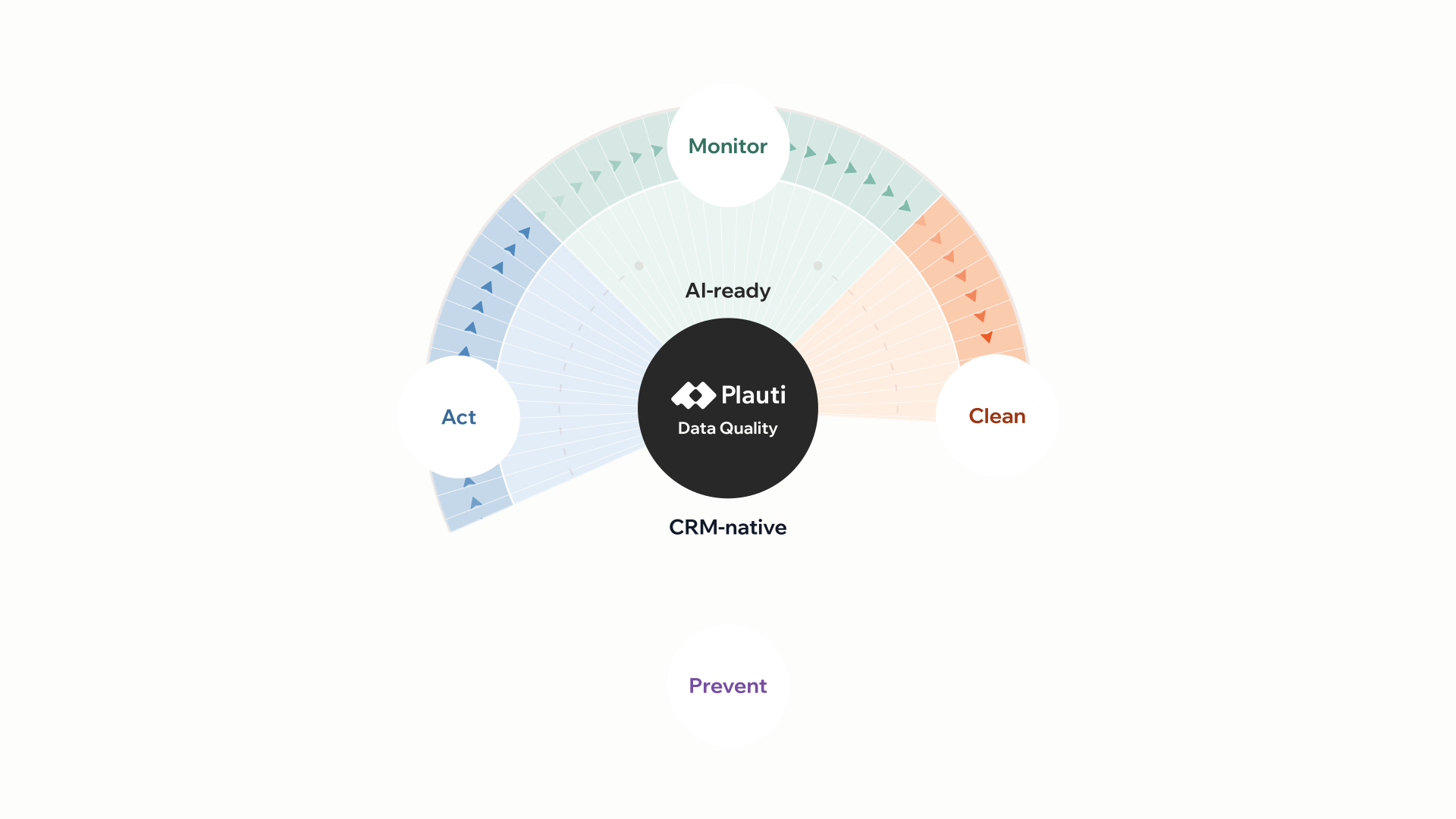
The Salesforce data quality lifecycle has four connected stages: Monitor, Clean, Prevent, Act, instead of four separate purchases. Monitor shows where you stand, with a Data Quality Score for each object. Clean fixes what can be fixed in bulk: duplicates found and merged, contact data verified, fields standardized. Prevent stops the same problems from landing again at the entry points you cover, from record pages to imports and integrations. Act puts the cleaned data to work in routing, reporting, and automation. Run one stage without the others and the gap reappears: cleanup with no prevention repeats every quarter, and prevention with no monitoring has no way to know where the next problem is forming.

Sound familiar? You’re not the only one. In Salesforce Ben's 2026 Admin Survey of 1,134 Salesforce professionals in 72 countries, 46.7% said they still catch data problems in a spreadsheet after the bad data is already in the org. The four stages below are a way to work through that, and they start with a number: Plauti Monitor rates every object, field, and record from 1 to 100, so you can see which are ready for automation and AI and which to fix first.

What the Salesforce data quality lifecycle actually is

The Salesforce data quality lifecycle groups everything a data-quality program does into four stages that hand off to each other: Monitor sees what's wrong; Clean fixes what can be fixed in bulk by finding and mergin duplicates, verifying contact data, and standardizing fields; Prevent stops it from coming back, and Act puts the cleaned data to work. Each stage gives the next one its starting point, and you decide what moves forward: the Monitor score shows you where to start cleaning, what you clean gives Prevent something worth protecting, and Prevent is what makes the data reliable enough for Act to route, report on,or automate against.

Stage Job What it covers
Monitor See what's wrong Check data health, health score, document CRM data, monitor & get alerts
Clean Fix what's wrong Find & merge duplicates, verify CRM data, standardize fields
Prevent Stop bad data at the door Duplicate prevention, validate at entry, bulk prevention
Act Use trusted data Route & assign records, automate on trusted data

Most Salesforce data-quality tools cover only one of those stages. A monitoring tool spots a problem and stops there. A dedupe tool cleans a batch but has no way to warn the next form submission. The lifecycle only works end to end when one platform carries a record through all four stages.

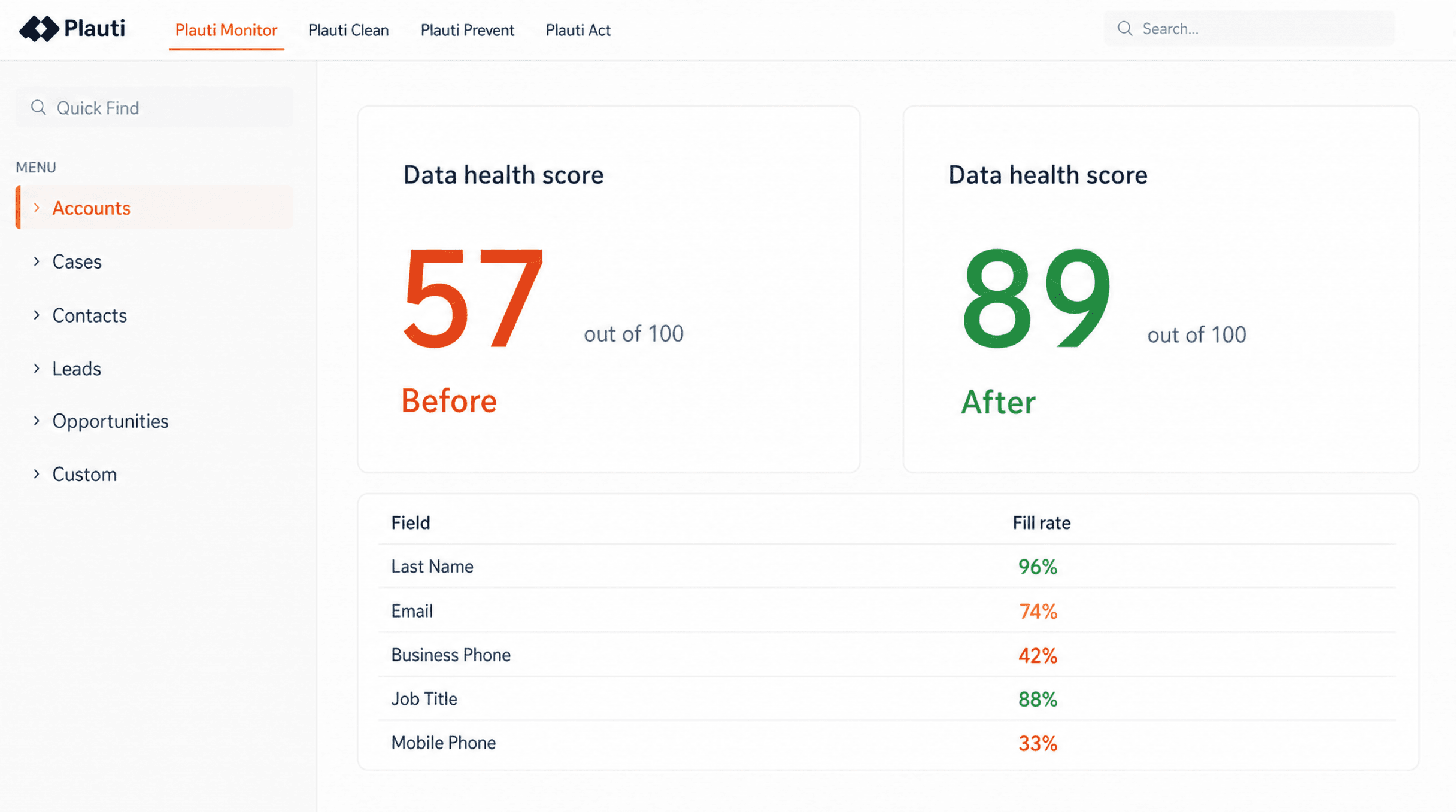
A Plauti Monitor data health score for Accounts, 57 out of 100 before cleanup and 89 after, above a table of fill rates per field

Monitor: how do you know if your Salesforce data is ready for AI?

One Monitor job runs 20+ data analyses across the objects and fields you choose - fill rate, duplicate-value rate, format patterns, orphaned lookups, picklist usage - and turns the results into a Data Quality Score from 1 to 100 for each object, field, and record. You set how much each field and each analysis counts, so the score reflects what matters in your org. A data-quality problem shows up as a number before it shows up as a bounced campaign or a lost lead.

A spreadsheet check only catches a problem after it has already shipped to a report, a campaign list or a rep's queue.

Monitor changes the order. Data health check scores your objects, fields, and records first, so you can see which are ready for automation and AI and which to fix first. Document CRM data gives every field its own documentation: what it holds and why. Monitor and alerts reruns the check on a schedule, so a slipping score gets caught before a QBR does. None of this fixes anything itself; that's Clean's job. But it shows you exactly where to start in Clean instead of cleaning by guesswork.

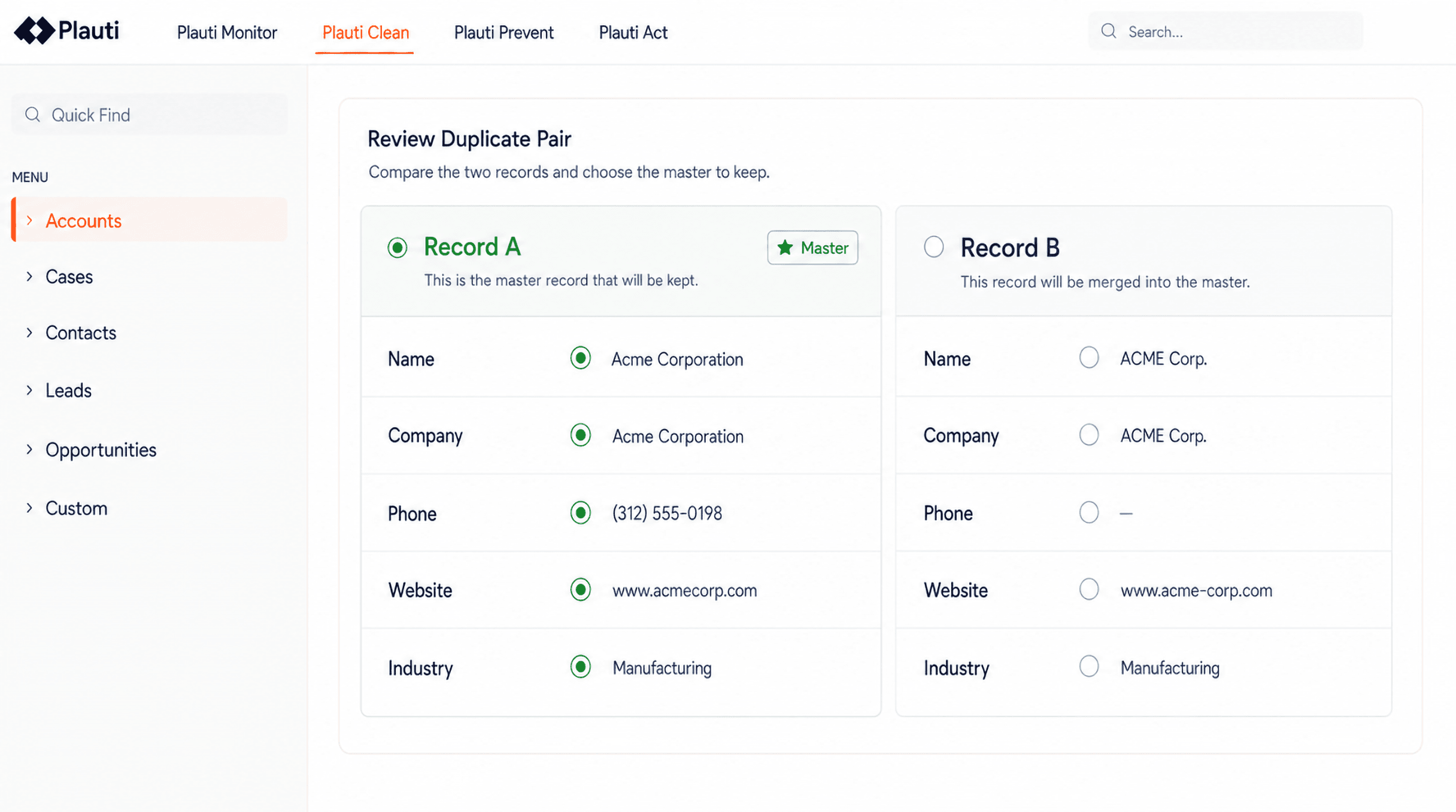
Two duplicate records side by side in Plauti, compared field by field before they are merged

Clean: what does fixing Salesforce data actually involve?

Clean is where duplicates get found and merged, contact data gets verified, and fields get standardized, at the scale of a full Salesforce org rather than one record at a time. Find and merge duplicates runs matching - exact, fuzzy, synonym, cross-object - across standard and custom objects. Verifying CRM data is the action that gets a contact record to a healthy state: it validates email addresses with syntax, DNS and mailbox checks, and validates and formats phone numbers to the standard you choose, and validates addresses, suggesting exact or similar matches. Standardize fields applies bulk updates, ownership changes, and find-and-replace across whatever a report or list view returns

Wedgewood Weddings, a US wedding-venue company, used to spend about 5 minutes manually merging each duplicate lead: comparing records, copying fields across, re-parenting related records by hand. After moving that work into Salesforce-native merging and verification, a merge takes about 20 seconds, a 93% cut in merge time. The freed-up contact center capacity let agents handle 25% more venues each, and the company booked a record 575 tours in a single day, up 28% year over year.

Robin Hood Foundation faced a bigger backlog: 220,000+ contact and account records built up over more than 10 years in Salesforce, with about 2,600 duplicate pairs identified, nearly all at a 95%+ match score. The team merged 54.9% of those pairs, about 1,427, in two weeks, saving 713 hours of manual work. "The system is only as good as the data that is in our system," says Hao Lyu, the foundation's Director of Business Intelligence.
Prevent: how do you stop the same duplicates from coming back?

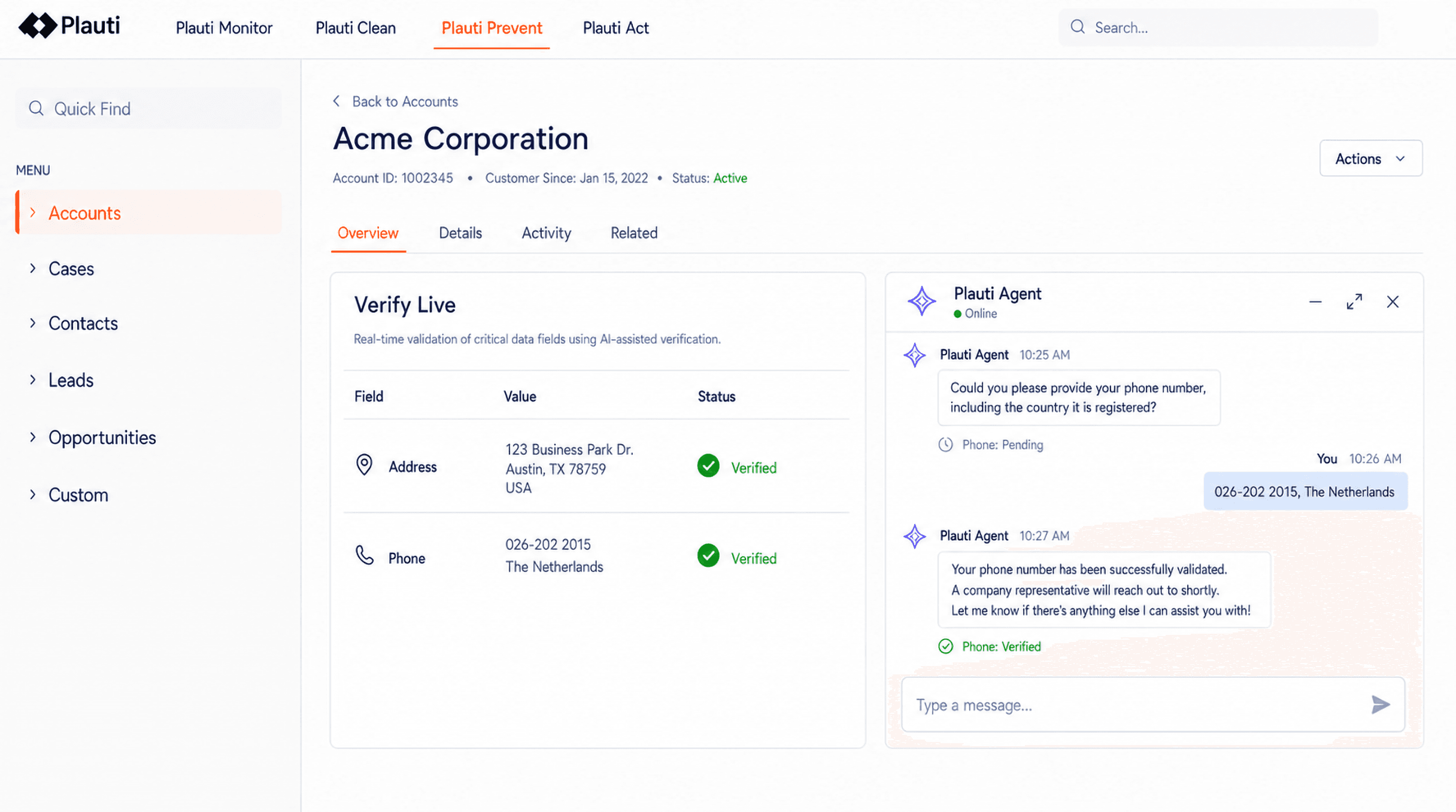
Prevent checks a record before it lands, not after: at manual entry, in a Flow, during an import, or through an API call. That's what keeps the backlog Clean just cleared from rebuilding itself. Duplicate prevention blocks or warns at the point of save. Validate at entry runs the same email, phone and address checks live, on the record page, and for email and phone through Agentforce. Bulk prevention applies the same logic to records arriving through integrations and data loads, not just a form.

This is the stage a one-time cleanup project skips, and it's why the fixes don't stick. Robin Hood Foundation learned this from its own decade of duplicates: after clearing the backlog, the team embedded duplicate checking directly into its custom contact-creation flow in Salesforce.

Before a record saves, the flow checks for a match and, if it finds one, warns the user and directs them to the existing record instead of creating a new one. "A lot of the dupes were actually introduced during the manual creation process," says Hao Lyu. "We've embedded Plauti into the flow so that before folks save a record, it checks whether there are potential dupes." The foundation still runs an annual cleanup for edge cases and plans to extend the same checks to its API integrations.

Act: what does clean Salesforce data actually get used for?

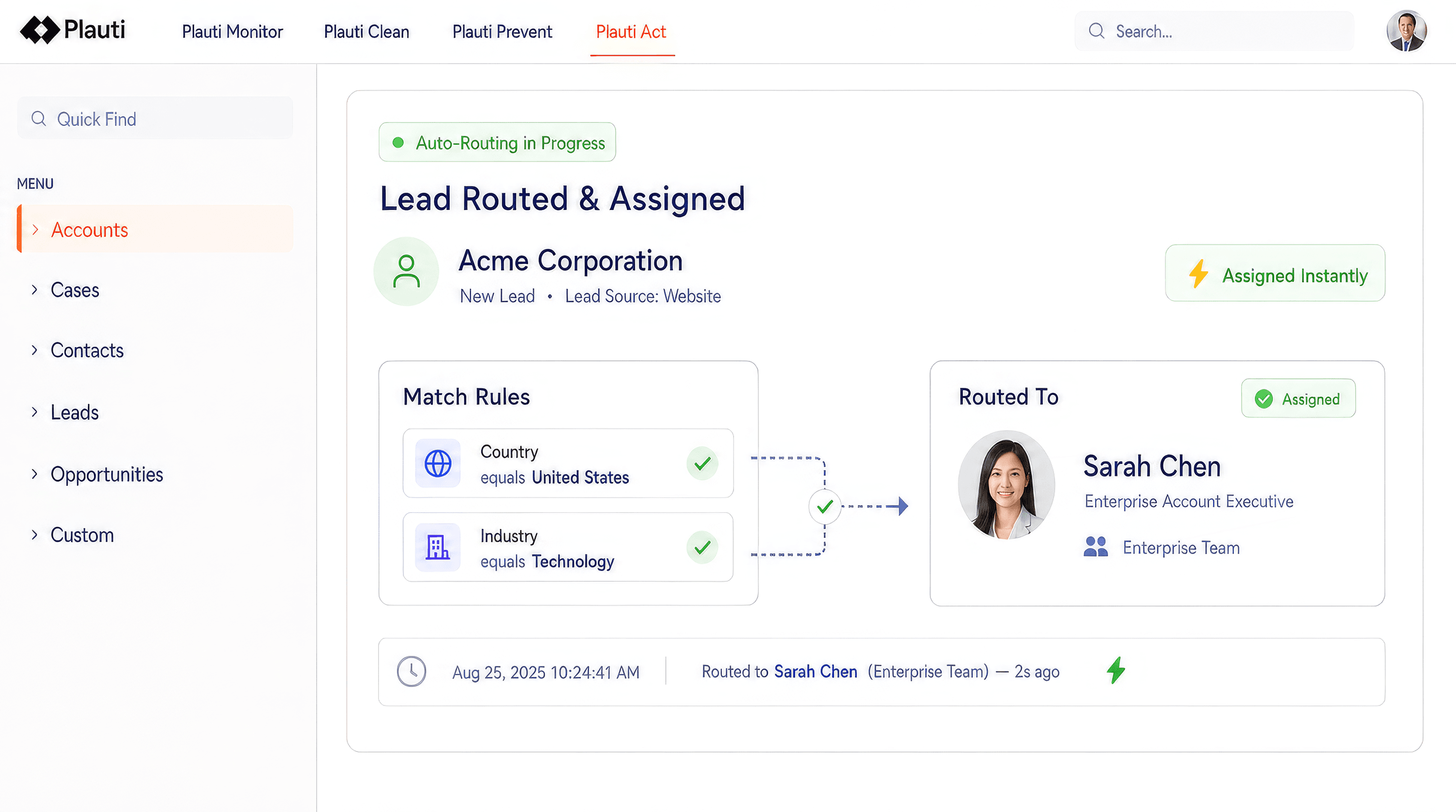
Act is where clean data pays for itself. Route and assign records sends a new lead, case, or opportunity to the right rep by territory, skill, or capacity the moment it's created. Automate on trusted data runs dedupe, verification, and field actions from a Flow, on a schedule, from a list view or through the API, and logs what each run changed. Neither stage does much good on dirty data: a routing rule that reads a blank or duplicate field routes the wrong person, and an automation that acts on a bad address just repeats the mistake faster.

MatchGroups define who gets which record, using round robin, load-balanced or capacity-based distribution, with SLA-based reassignment if a record goes untouched. Clean and Prevent are what make an Act-stage automation safe to run. A report exported for analytics, an AI agent reading a field, or a rep's queue all inherit whatever state the first three stages left the record in.

Why the four stages have to run as one lifecycle

A tool that only monitors finds problems it can't fix. A tool that only cleans has no way to stop the next duplicate from arriving. A tool that only prevents has nothing to say about the backlog that's already there. Run any one stage alone and the other three gaps stay open, which is why most Salesforce data-quality work ends up as several disconnected tools instead of one program.

Two customer results make the same point from different ends of the lifecycle. Wedgewood Weddings paired Clean’s fast merges with Prevent’s duplicate and contact checks at lead entry before its 25% contact center capacity gain showed up. Robin Hood Foundation needed Clean to work through a decade of duplicates across 220,000+ records before Prevent’s Flow-based checks had a clean base to protect. Neither result comes from one stage in isolation. It comes from the handoff between stages. That handoff is what a single platform running Monitor, Clean, Prevent and Act inside Salesforce is built to carry, instead of asking a team to stitch together whatever a monitoring tool, a dedupe tool, and a routing tool each happen to export.

If you are being asked whether your org is ready for AI, start with the score. Run a Monitor job on the objects your agents and automations read from most, look at the lowest-scoring fields, then work through Clean, Prevent, and Act from there. As Robin Hood Foundation’s Hao Ly puts it: “Data is the foundation for the success of deploying AI.”

Hungry for more?

Frequently asked questions

What is the Salesforce data quality lifecycle?

It's the four connected stages a data-quality program moves through inside Salesforce. Monitor finds what's wrong with a field-level health score, Clean fixes it by merging duplicates and verifying contact data, Prevent stops the same problems from landing again at every entry point, and Act puts the resulting trustworthy data to work in routing, reporting and automation.

Do you need to run all four stages, or can you start with one?

You can start with one stage, and Monitor or Clean is the usual starting point since they show a result soonest. Running only one stage leaves a gap: cleaning without prevention means the same duplicates return, and monitoring without cleaning just produces a health score nobody acts on. The stages hand off to each other, so the value compounds as more of them run.

How is this different from a one-time Salesforce data cleanup?

A cleanup clears an existing backlog and stops. The lifecycle adds Prevent and Monitor around that cleanup, so the backlog doesn't rebuild itself. Robin Hood Foundation cleared its backlog in two weeks, then moved duplicate checking into its Salesforce Flow so new duplicates get caught before they save, instead of needing another cleanup next year.

Does this work with AI and Agentforce?

Validate-at-entry checks can run inside an Agentforce conversation, and the wider point of the lifecycle sits upstream of any specific AI feature. An AI agent, a routing rule or a report all read whatever state Monitor, Clean and Prevent left the underlying record in. Clean, deduplicated data is a precondition for a trustworthy AI output, not a separate project.

See it inside your own org

Product tours walk through Monitor, Clean, Prevent and Act without installing anything, so you can see how the lifecycle fits your Salesforce org before talking to anyone.