Skip to content

Why native Dynamics 365 duplicate detection fails at go-live

  • Dynamics 365
  • Deduplication
  • Consulting
Native D365 duplicate detection fails. Photo by Tim Gouw on Unsplash

You're three days from go-live. The migration is done, the data is in, and the client is running final validation. Then someone opens the Accounts list and starts scrolling.

Same company, three times. Different spellings, different owners, one record with a phone number and two without. The client asks if this is normal. You say you'll look into it.

You check the duplicate detection rules. They're on. They've been on. You test one manually: create an account with a name that already exists, and the warning fires exactly as it should. The rules work.

So why are there duplicates?

This is the moment most Dynamics 365 consultants hit at least once. It isn't a misconfiguration, and it isn't something missed in the project checklist. It's a structural gap in how native duplicate detection was built, and go-live week is exactly when that gap opens widest.

What was native duplicate detection built for?

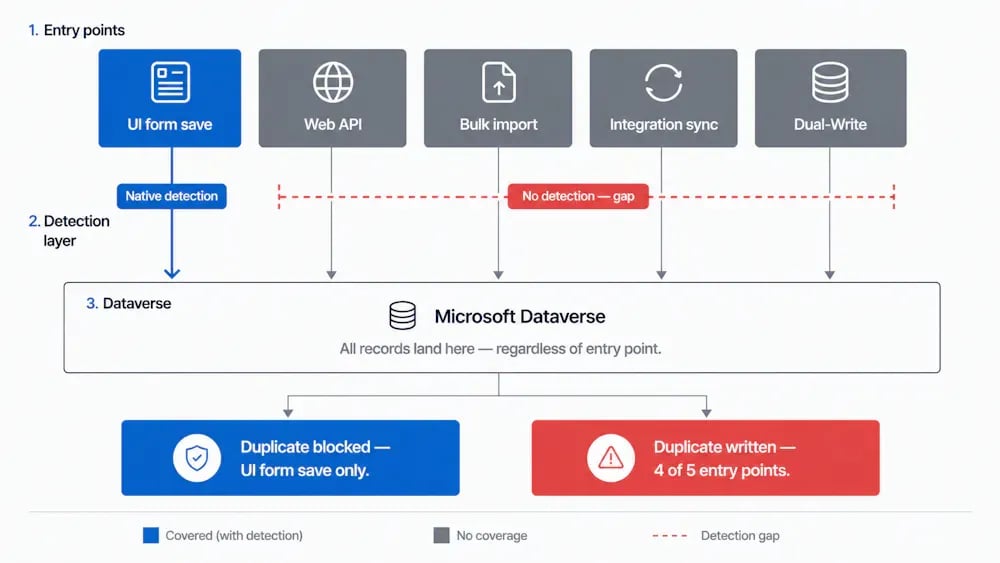
Native duplicate detection in Dynamics 365 CE does one thing reliably: it catches duplicates entered through the UI.

A user opens a new Contact form, enters an email address that already exists, clicks save, and the warning fires. They see the potential duplicate, review it, and decide whether to proceed. That workflow works. It was designed for exactly that scenario.

The rules themselves are flexible. You can match on email, phone, company name, and combinations of fields, and scope them by entity. For a clean, UI-driven data entry workflow, native detection is a reasonable first line of defense.

The problem is that go-live week is not a clean, UI-driven data entry workflow.

Why does everything hit Dataverse at once during go-live?

Go-live week typically involves some combination of the following landing in Dataverse in a short window:

  • A legacy CRM migration pushing tens of thousands of records via bulk import or API
  • A Dual-Write sync initializing Finance & Operations data into CE
  • Power Automate flows activating for the first time and creating records from connected systems
  • Marketing automation syncing contacts from a campaign platform
  • Manual data entry from the team doing final cleanup

Native duplicate detection rules don't fire on most of these. Bulk imports via the Web API bypass detection by default unless the integration explicitly opts in. Dual-Write sync doesn't trigger the rules. Automated flows creating records don't run detection unless they're built to do so.

The rules that work fine in testing, where a consultant is manually creating records through the UI, are largely invisible to the actual data volume arriving at go-live.

Why does "Ignore and save" make it worse?

Even for records that do trigger detection, entries made through the UI during go-live week, there's a second failure mode.

When native detection fires, it presents the user with a warning and two options: review the potential duplicate or dismiss the warning and save anyway. The "Ignore and save" path takes one click. Under go-live pressure, with a team trying to get everything entered before the cutover deadline, that button gets clicked a lot.

There's no enforcement mechanism, no way to require review before saving, and no audit trail of how many warnings were dismissed. The detection ran; it just didn't stop anything.

What's the ceiling on bulk duplicate detection?

The standard response to discovering post-migration duplicates is to run a bulk duplicate detection job: find what got through, merge it, and clean up.

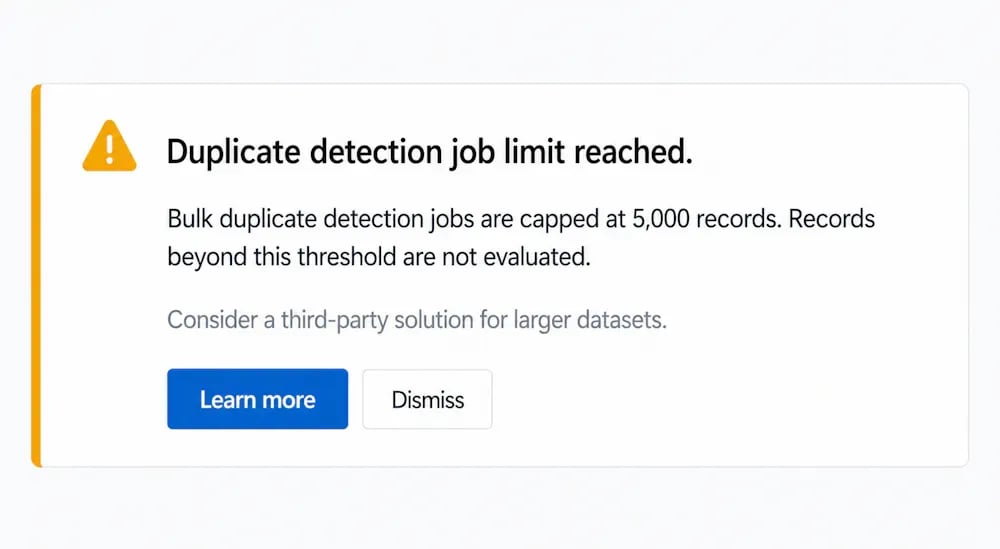
The bulk detection job in Dataverse caps at 5,000 records.

On any mid-market migration, that ceiling is hit before you've touched most of the dataset. You end up running the job in batches, tracking what's been processed, and managing a cleanup operation that keeps expanding, because new records keep arriving through active integrations while you work through the backlog.

This isn't a detection strategy. It's a cleanup operation with a fixed size limit, running against a dataset that isn't standing still.

Why does this happen on every project?

The pattern here isn't bad luck or a misconfigured environment. It's structural.

Native duplicate detection was built for one entry point: the Dynamics 365 UI. Every other way a record reaches Dataverse, the Web API, bulk imports, integration syncs, automated flows, is architecturally separate, and each one bypasses detection by default unless someone explicitly builds around it.

On a typical Dynamics 365 project, the number of entry points grows with the implementation. The legacy CRM migration is one. The ERP integration is another. The marketing platform sync is a third. Each requires its own configuration or workaround to enforce detection, and each is a potential gap.

Go-live week is when all of those entry points activate at once, with real data volume, under time pressure. It's the worst moment to discover that native detection only covered one of them.

Why adding more rules doesn't fix it

More duplicate detection rules don't close this gap. The rules work fine; the problem is that they don't run on the entry points that matter most during go-live.

The fixes consultants typically reach for, setting the SuppressDuplicateDetection: false header on Web API calls (see how Web API inserts bypass D365 duplicate detection by default), writing plugins on the Create message, running post-load cleanup scripts, each address one entry point at a time. On a project with four active integrations, that's four separate fixes to maintain, each scoped to a specific connector or entity, each rebuilt on the next project.

Closing the gap structurally means running duplicate prevention inside Dataverse itself, at the platform level, regardless of how a record arrived, covering standard and custom tables, working across every entry point, without per-integration configuration.

What to do before your next go-live

If you're mid-project, map your entry points now, not during cutover week. For each one, the Web API, bulk imports, Dual-Write, integration syncs, check whether duplicate detection is actively running or relying on the UI default. The Web API header behavior alone accounts for a significant share of the duplicates that show up at go-live.

Go-live week should be about cutover confidence, not duplicate cleanup.

Hungry for more?

Frequently asked questions

Why does Dynamics 365 duplicate detection stop working after a migration?

Native duplicate detection in Dynamics 365 CE only fires on records entered through the UI. Bulk imports and Web API calls bypass detection by default unless the integration explicitly opts in using the SuppressDuplicateDetection: false header. Most migration tooling and integration connectors don't set this header, so duplicates arrive silently regardless of whether your detection rules are configured correctly.

Why are there duplicates in Dynamics 365 even though duplicate detection rules are turned on?

Duplicate detection rules in Dynamics 365 cover UI-based data entry but don't automatically apply to Web API inserts, bulk imports, Dual-Write syncs, or Power Automate flows. Each of these entry points needs separate configuration to enforce detection. If any of them aren't explicitly set up, records arrive without being checked against your rules.

What is the bulk duplicate detection job limit in Dataverse?

The bulk duplicate detection job in Dataverse caps at 5,000 records per run. On mid-market migrations with larger datasets, the job needs to be run in batches, which makes post-migration cleanup time-consuming and hard to manage while new records keep arriving through active integrations.

How do I prevent duplicates from being created during a Dynamics 365 go-live?

Map all active entry points into Dataverse before go-live, including the Web API, bulk imports, Dual-Write, and integration syncs, and verify that duplicate detection is running on each one. For teams managing multiple integrations or repeated migrations, a prevention layer inside Dataverse that covers every entry point regardless of how records arrive is the structural fix.

Ready to take control?

With a product tour you can walk through the product yourself without installing anything, or book a demo for a guided look.